Almost everything written about Microsoft Copilot is wrong, and it's usually wrong the same way. The writer picks up one Copilot, compares it to ChatGPT, and reaches a verdict about a completely different product.
That's not carelessness. Microsoft has attached the word "Copilot" to at least four separate things with different prices, different capabilities, and different owners inside the company. Two of them share a name and cost $10 a month apart, and only one of them does the thing all the marketing is about.
This article fixes that. By the end you'll know exactly which Copilot you have or would be buying, how to get real work out of it, and what the evidence says it's actually worth. Some of that evidence is unflattering, and we're going to look at it honestly, because several governments deployed Copilot at enormous scale and published what they found. That's a rare gift. Almost no AI tool has been studied this rigorously, and skipping the results to keep a tutorial upbeat would be doing you a disservice.
Two quick notes before we start. First, if you already have Copilot through work or a Microsoft 365 subscription, skip ahead to Section 04, which is the practical part. If you're deciding whether to pay, Section 06 has the money. Second, Copilot changed shape three weeks ago, so if you've read about it before, some of what you know is already out of date.
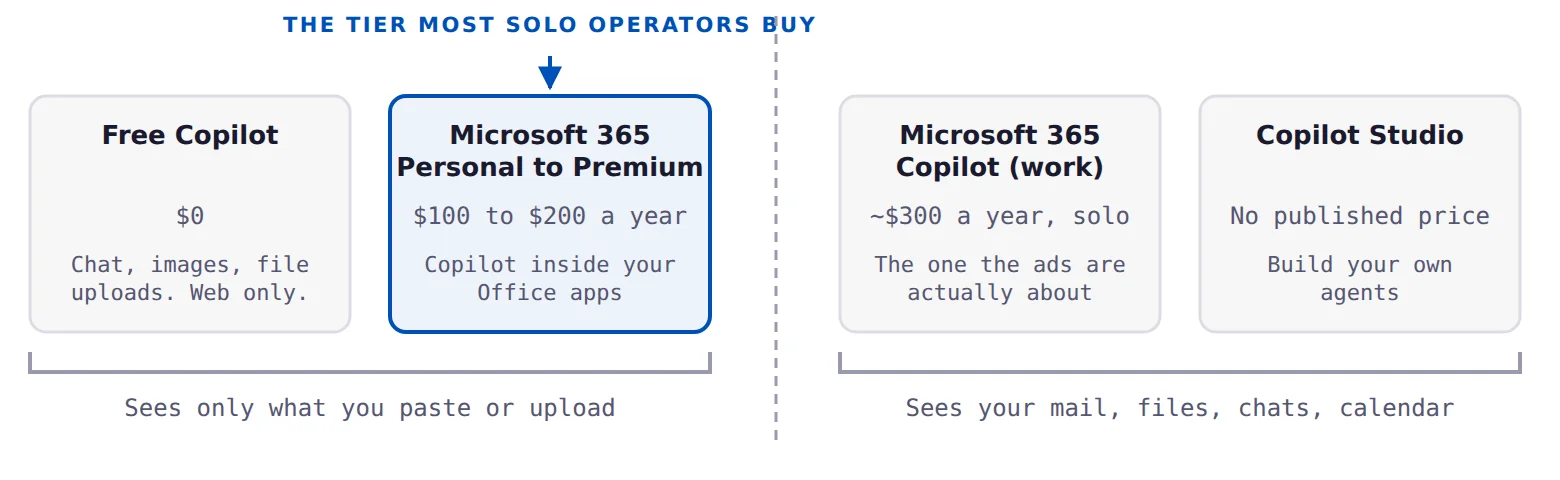
There are four Copilots, not one
Here's the whole mess in one place. Read this section once and most Copilot confusion disappears permanently.
1. Free Copilot
The assistant at copilot.com, in the Windows 11 taskbar, in Edge, and in the phone apps. Sign in with a personal Microsoft account and it costs nothing. You get web-grounded chat with citations, image generation, file uploads, voice conversation, memory, and a few workspace features called Pages and Notebooks.
Microsoft no longer publishes usage limits for the free tier. The exact wording is that you can chat, create images, and upload files for free "subject to available capacity and limits." Every specific number you'll find online, the "300 messages a day" figure and its cousins, traces back to July 2024 and is obsolete. Nobody outside Microsoft knows the current caps, and that's worth knowing before you build a workflow on top of them.
2. Microsoft 365 consumer subscriptions
This is where most solo operators and creators actually meet Copilot, usually by upgrading a subscription they already had.
| Plan | Per year | Per month | What the Copilot part gives you |
|---|---|---|---|
| Microsoft 365 Personal | $99.99 | $9.99 | Copilot inside Word, Excel, PowerPoint, Outlook, and OneNote. Higher chat limits. 60 AI credits a month. |
| Microsoft 365 Family | $129.99 | $12.99 | The same, but only for the subscription owner. Not shareable. |
| Microsoft 365 Premium | $199.99 | $19.99 | Extensive usage, plus the Researcher and Analyst agents and 25 agent tasks a month. |
Two things people consistently get wrong here, and the second one is expensive.
The first: Family does not give your family Copilot. Microsoft's own footnote says AI features are available only to the subscription owner and cannot be shared. Five other people on the plan get Office and storage. They do not get the AI.
The second is the big one. These consumer plans do not include the work-data grounding that all the Copilot marketing is about. You get Copilot living inside your Office apps, which is useful. You do not get the version that reads across your whole organisation's email, files, and chats. Buy Microsoft 365 Personal expecting Copilot to know everything about your business, and you'll be disappointed, and you'll probably blame the AI when the real problem was the subscription tier.
Copilot Pro is gone. The $20 a month standalone plan was discontinued in October 2025, and support for existing subscribers ended on 1 August 2026. If an article recommends it, that article is out of date and everything else in it probably is too.
3. Microsoft 365 Copilot, the work product
This is the one Microsoft means on an earnings call. It's the version with the actual differentiator: it queries your organisation's mail, files, chats, meetings, and calendar under your existing permissions.
| Plan | Annual | Billed monthly | Seat limit |
|---|---|---|---|
| Microsoft 365 Copilot (enterprise add-on) | $30.00 | $31.50 | None |
| Microsoft 365 Copilot Business (add-on) | $18.00 promo, $21.00 list | $25.20 | 1 to 300 |
| Business Standard with Copilot | $23.50 | $28.20 | 1 to 300 |
| Business Premium with Copilot | $32.00 | $38.40 | 1 to 300 |
Prices are per user per month. The $18 Copilot Business price is a promotion running through 31 December 2026.
Every one of these is an add-on. Microsoft's own line: "A separate license for a qualifying Microsoft 365 plan is required." The cheapest realistic base plan is Microsoft 365 Business Basic at $7 a user per month. So if you're a one-person business and you want the real work-grounded Copilot, your floor is roughly $25 a month, or $300 a year. Hold that number, we'll come back to it.
There's also no trial. Microsoft states plainly that no trial is available for the paid Microsoft 365 Copilot plan.
The free work tier almost nobody knows about. Microsoft 365 Copilot Chat is free to anyone with a work account and an eligible Microsoft 365 subscription. Web-grounded chat, file uploads, and Pages. Since February 2026 it also includes Excel Agent Mode and Outlook inbox grounding without a paid licence. If your employer has Microsoft 365 but didn't buy Copilot seats, you may already have more than you think.
4. Copilot Studio
The platform for building your own agents. It's free to licence and charged on consumption. We'll deal with it in Section 06, where the answer for solo operators is short and it's a no.
What changed in 2026
Copilot moved more in the past nine months than in the two years before it. If your mental model is older than this summer, it's stale.
The apps merged. In August 2026 Microsoft folded the consumer Copilot app and the Microsoft 365 Copilot app into one app, with an account switcher separating personal from work. Chat history and files migrated automatically. Mobile and web landed in mid-August. The Windows and Mac desktop versions are rolling out this month, so if your desktop app looks different from a screenshot you saw last week, that's why.
Five features were killed on 18 August. Deep Research, Podcasts, Group Chat, Copilot Labs, and the Mico character in voice mode. Deep Research had a successor called Researcher, but it moved to the $19.99 Microsoft 365 Premium tier, skipping Personal and Family entirely. Podcast content and group chat threads were not migrated and there was no export option, so anyone who had made things there lost them.
Microsoft pulled Copilot back out of Windows. In March 2026 it removed Copilot from Photos, Widgets, Notepad, and Snipping Tool, and shelved planned integrations in Settings and File Explorer. The Windows executive who announced it wrote that it was "critical that we remove Copilot from places where it doesn't live up to its promise," then deleted the post. In May, Microsoft conceded that the floating Copilot button in Word, Excel, and PowerPoint "was a mistake" and shipped an option to hide it. A company walking back its own AI features is unusual and worth noticing.
The Excel formula died. A worksheet function called COPILOT() was announced, previewed, and then cancelled before it ever shipped properly. It retires on 14 September 2026. Microsoft's statement: "We have decided not to move forward with this feature." More on why in Section 05.
How Copilot actually differs from ChatGPT and Claude
The usual answer is "it's Microsoft's ChatGPT." That's wrong in a way that leads people to buy the wrong thing, so let's be precise. There are two real differences and one of them is a genuine advantage.
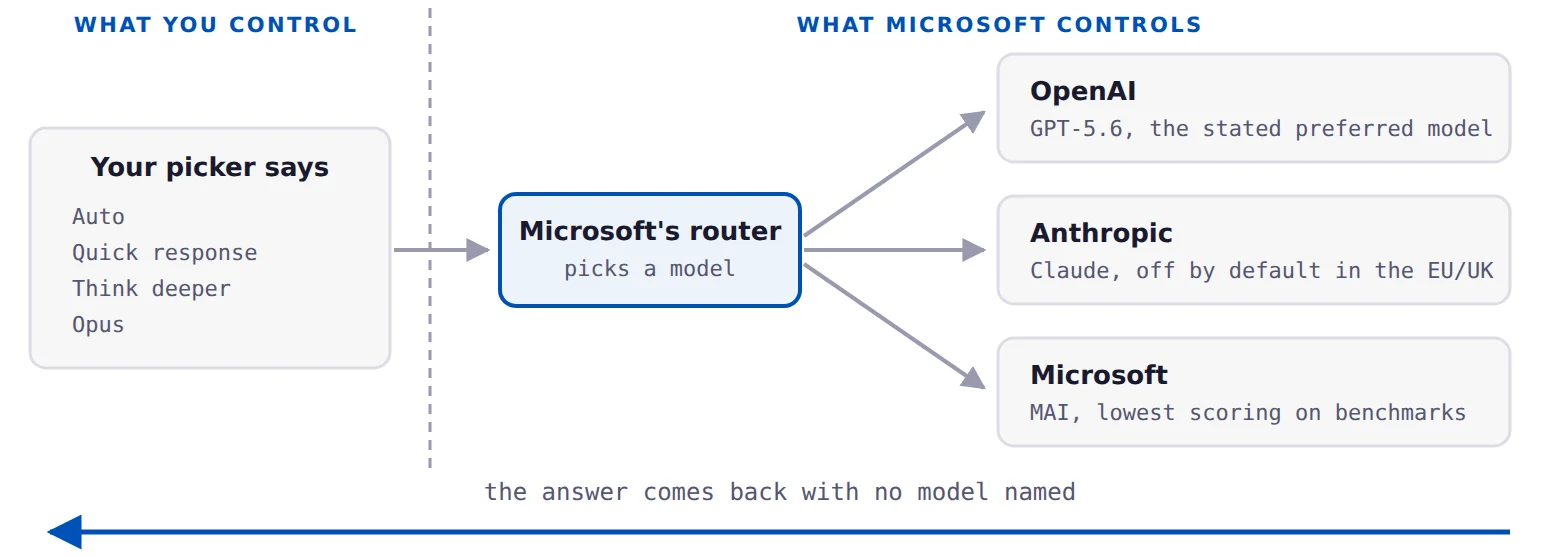
Copilot is not a model. It's a router in front of several.
When you ask ChatGPT a question, you know which model answered, because you picked it. Copilot doesn't work that way. Microsoft runs a router that sends your prompt to whichever model its own systems choose, and as of September 2026 that pool spans three different companies:
- OpenAI. GPT-5.6 was announced in July 2026 as the "preferred model" for Microsoft 365 Copilot.
- Anthropic. Claude became an official Microsoft subprocessor in January 2026 and Claude models are now selectable across Copilot, Researcher, and the Microsoft 365 apps. They're on by default outside the EU, the UK, and EFTA countries, and off by default inside them.
- Microsoft's own MAI models. Announced at Build in June 2026. Bloomberg reported in July that Microsoft had started routing Copilot traffic to them inside Excel and Outlook, and the stated reason was cost.
Microsoft does not tell you which model answered your question. In fact, the model picker in Microsoft 365 Copilot lost its model names in July 2026. Where it used to say GPT-5.5, it now says Auto, Quick response, Think deeper, and Opus. The framing shifted from which model to how much thinking.
This matters practically, not philosophically. It means a Copilot feature that behaved one way in spring can behave differently in summer without anyone telling you. It means any quality test you run has a shelf life of a few weeks. And it's worth knowing that on the public SWE-bench Pro coding benchmark, Microsoft's own MAI models score at the bottom of the pool it draws from, around 52 percent, against roughly 80 percent for the strongest Claude model. Copilot is increasingly being routed to the weakest models in its own lineup, for reasons that are about Microsoft's costs rather than your output.
Copilot reads your work data. That's the actual product.
This is the real advantage and it's a genuine one. Through Microsoft Graph, and a newer layer called Work IQ, Copilot can query your organisation's mail, files, chats, meetings, and calendar. It does so under your existing permissions. Microsoft's commitment is explicit: Copilot "only surfaces organizational data to which individual users have at least view permissions."
What that buys you is a category of question no chat window can answer. "What did we agree with this client back in March, and what have we shipped since" is answerable in work-grounded Copilot. It is not answerable in a tool that has never seen your files. That's a real difference, not a marketing one.
Microsoft's data commitments are also strong and worth stating fairly, because they're Copilot's best argument. Prompts, responses, and data pulled through Microsoft Graph are not used to train the underlying models. Copilot respects sensitivity labels. It's covered by GDPR, ISO 27001, and HIPAA commitments.
There's one live exception that matters if you have European clients. Microsoft's own documentation states that Anthropic models running inside Copilot "are currently excluded from the EU Data Boundary." So the data residency guarantee, which is the single thing most often cited as Copilot's enterprise advantage, is conditional on which models your organisation allows. That's a real detail and almost nobody is writing about it.
The one-sentence version. ChatGPT and Claude are better models with no idea who you are. Copilot is a rotating cast of models that has read your inbox. Which one wins depends entirely on whether the answer you need is in your inbox.
How to actually use it
This is the practical core, and it rests on a single rule that everything else follows from.
Use Copilot where your data lives. Not as a chat window.
In a chat window, Copilot competes with ChatGPT and Claude on their home turf, and it loses. Inside your inbox, your calendar, or the document you already have open, it competes with nothing at all.
Every measured win in every study of Copilot falls into the second category. Every disappointment falls into the first.
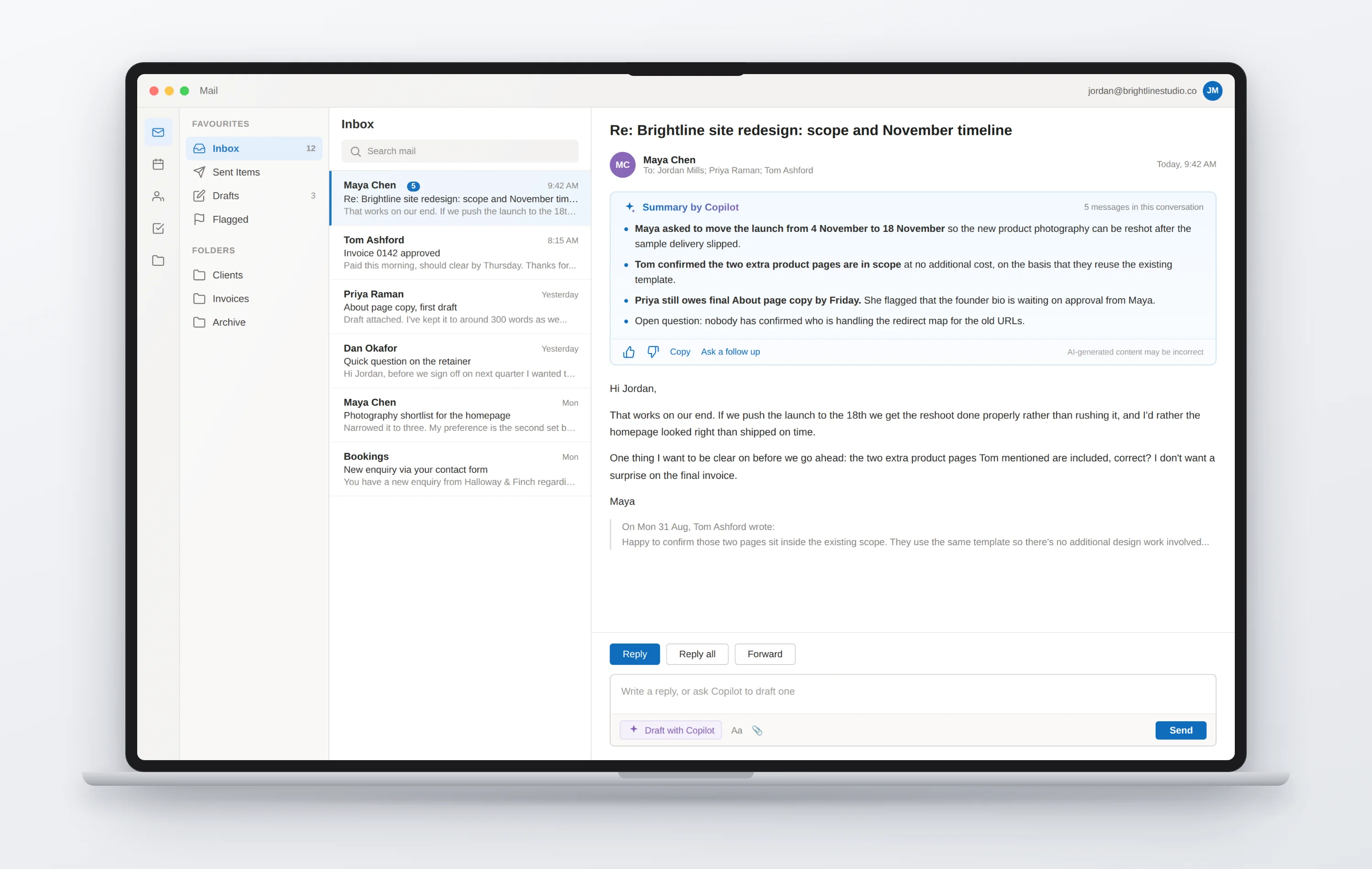
Outlook: this is the strongest case
If you take one thing from this article, take this one. Email is the only Copilot benefit that survives objective measurement in a properly designed trial, and we'll look at that evidence in the next section. If your inbox is a meaningful part of your job, Copilot in Outlook earns its keep.
What to use it for:
- Thread summaries. Open a long chain and ask for the summary before you read any of it. This is the highest-value thirty seconds in the product.
- Draft replies with a specified tone. Don't just say "reply." Say "reply declining, warm but firm, mention I'm available in October."
- Coaching on a draft you wrote. It reviews tone and clarity before you send. Genuinely useful on anything difficult.
- Meeting prep. Ask what you need to know before a call with a particular person, and it pulls from prior threads.
- Natural-language inbox management. Added in August 2026. You can ask it to organise messages, apply categories, and create rules by describing what you want.
Word: first drafts and catch-up
Copilot in Word drafts, rewrites, summarises, and answers questions about the document you have open. The 2026 additions are more interesting than the originals. Copilot Catchup summarises what changed since you last opened a document, which is quietly excellent for anything with collaborators. It also builds and maintains document structure, so tables of contents, headers, and footnotes stay correct as you edit. And it can act on edits requested in review comments, which saves a lot of tedious clicking.
One hard limit to know. Microsoft's stated guideline is that Copilot can handle documents up to 1.5 million words. In practice, users have documented a 65,000-word file being silently truncated, and a Microsoft moderator confirmed the guideline is "not a guarantee." You get no warning. So if you ask for a summary of something long and the answer feels thin, assume it only read part of it. For anything past roughly 20 to 30 pages, check that the summary actually covers the end of the document.
PowerPoint: better than you'd expect
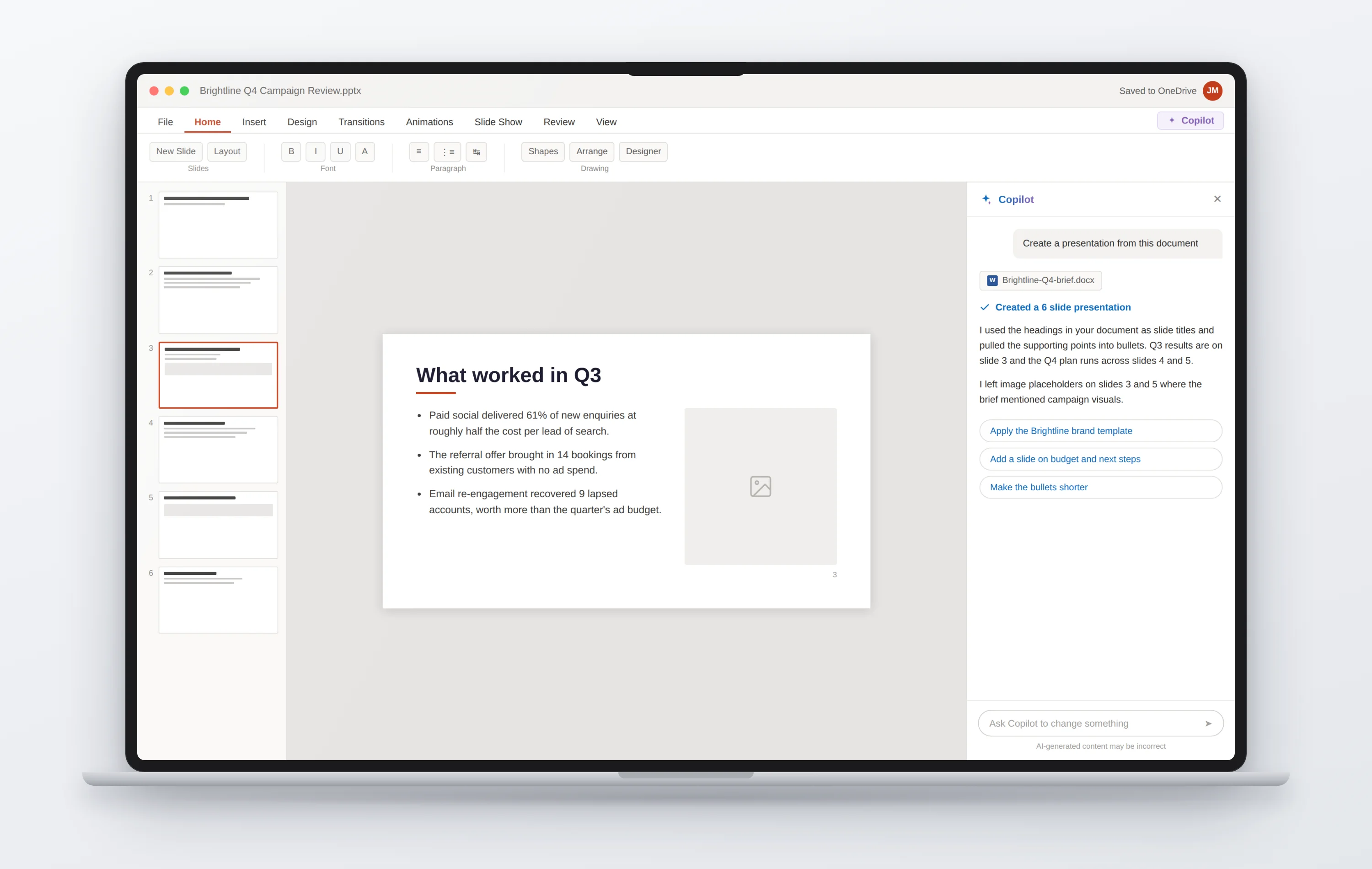
This one has improved sharply and gets less credit than it deserves. Copilot builds decks from a prompt, from an existing document, or from a folder in OneDrive. That last one is genuinely useful: point it at the Word document you already wrote and let it draft the deck.
The 2026 additions matter if you deliver work to clients. There's an admin-approved Brand Kit, a strict brand adherence mode that locks Copilot to approved templates and blocks layout changes, and "note steering," where you write plain-language instructions in the slide notes and Copilot follows them slide by slide. That last one is the closest thing to directing it properly.
Teams: recaps and transcript search
Meeting recaps are consistently among the highest-adopted Copilot features in every study, and for good reason. Ask questions of a transcript after the fact, get action items captured automatically by the Facilitator agent, and search the last thirty days of meetings in one place.
Worth knowing: after user complaints, Microsoft added a mid-meeting toggle in July 2026 so organisers and presenters can switch meeting AI off during a call. If you record client calls, tell people the AI is running. It's a courtesy that costs nothing and prevents an awkward conversation later.
Excel: use it carefully
We'll cover why in the next section, but the short version is that Excel is Copilot's weakest area by a wide margin, and it has been measured as such. The newer Agent Mode is materially better than the older in-app Copilot, and it can now use Python for analysis. But it scores 57 percent on the standard spreadsheet benchmark against a human baseline of 71 percent, which means it's meaningfully worse than a competent person.
Use it for formula generation and explanation, for conditional formatting, and for describing what a workbook contains. Check every number it produces. Never paste a Copilot-generated analysis into something a client sees without verifying the arithmetic yourself.
How to prompt it well
Copilot rewards specificity more than most tools, because it has to decide what to go and fetch before it answers. Three habits do most of the work:
Reference the specific file, thread, or meeting rather than hoping it finds the right one. Vague requests produce vague retrieval.
"Summarise this for a client who missed the call" gets a different and better answer than "summarise this."
Length, tone, audience, and format in the first prompt. Copilot is worse at iterative refinement than the chat tools you're used to.
If an answer looks odd, ask which files or messages it drew from. That usually reveals the problem faster than rephrasing.
Go find the features deliberately. Every single study of Copilot found the same problem: people forgot it was there. Participants in the Australian government trial "often forgot Copilot was embedded" in the apps they used daily. If you're paying for this, spend twenty minutes opening each app specifically to find where Copilot lives in it. That one habit separates people who get value from people who quietly stop using it.
What the evidence actually says
Here's the unusual thing about Copilot: the evidence base is excellent. Several governments rolled it out to thousands of staff and published the results. Microsoft's own economists ran randomised trials measuring actual behaviour rather than asking people how they felt. Almost no other AI tool has been examined this carefully.
The results are more complicated than either the marketing or the backlash suggests, and knowing them makes you better at using the tool.
The finding that shapes everything else
Nearly every "time saved" number you've seen about Copilot is self-reported. Somebody was asked how much time they thought they saved, and they answered. The handful of studies that measured what people actually did, using software telemetry rather than surveys, found much smaller effects and in several cases none at all.
The best-designed study in existence is a randomised field experiment across 66 companies and 7,137 knowledge workers, published as a US National Bureau of Economic Research working paper and revised in November 2025. It read outcomes from Microsoft 365 telemetry rather than asking anyone.
It found one clear win: two hours a week less time in Outlook among people who actually used Copilot, along with 10 percent fewer emails read and about two extra hours of uninterrupted, email-free work time.
It found no statistically significant change in Teams meeting time, meetings attended, document completion time, number of documents completed, or collaborative document production. In the authors' words: "Apart from these individual time savings, we do not detect shifts in the quantity or composition of workers' tasks."
The government trials
| Trial | Scale | Headline | The uncomfortable part |
|---|---|---|---|
| UK cross-government, June 2025 | 20,000 staff, 12 organisations | 26 minutes a day saved, self-reported | No control group. 17 percent reported no saving at all. Excel adoption peaked at 23 percent. |
| UK Dept for Business & Trade, Aug 2025 | 1,000 licences | 72 percent satisfied | "We did not find robust evidence to suggest that time savings are leading to improved productivity." Scheduling and image generation cost time. |
| UK Dept for Work & Pensions, Jan 2026 | 1,716 users vs 2,535 comparison | 19 minutes a day, 95 percent satisfied | 89 percent reinvested saved time into other tasks. None of it converted into extra output or shorter hours. |
| Australian government, Oct 2024 | 7,600 staff, 60+ agencies | 69 percent said their speed improved | The agency did not recommend a whole-of-government rollout. 60 percent needed moderate to significant edits. 61 percent of managers could not identify which work Copilot had touched. |
The satisfaction paradox
Look at those two right-hand columns together and you'll see the most interesting pattern in the whole corpus. Satisfaction is consistently high. Measured productivity is consistently absent. 95 percent satisfied at DWP with no output effect. 72 percent satisfied at DBT with no robust productivity evidence. In Australia, 86 percent wanted to keep it while 61 percent of their own managers couldn't tell which work it had touched.
People genuinely like Copilot. That's real and it shouldn't be dismissed, because a tool that makes a tedious job less tedious has value even if a spreadsheet can't find it. It's just not the same claim as making people more productive, and the entire sales pitch depends on treating them as one thing.
The Excel problem is real and specific
This is the most thoroughly evidenced weakness, and it comes from independent sources that agree with each other.
The UK Department for Business and Trade measured it directly: Copilot users "completed Excel data analysis more slowly and to a worse quality and accuracy than non-users." That is a measured negative effect, not a bad review. The Australian evaluation named "poor Excel functionality" as a specific barrier. Excel adoption topped out at 23 percent in the largest UK trial, the lowest of any core app. And the COPILOT() worksheet function was cancelled before general availability, with Microsoft itself conceding that results "may therefore change over time even when the formula receives the same arguments."
Independent testing of that function found it omitting airports from a list of airports, sorting US presidents by the wrong column, and returning 194 UN member states instead of 193.
None of this means avoid Excel Copilot. It means treat its output as a draft that a human checks, which is exactly how you should be treating all of it anyway.
The number that answers the buying question
Recon Analytics surveyed more than 150,000 US paid AI subscribers between July 2025 and January 2026 and asked a question nobody else thought to ask: what do people choose when they have a choice?
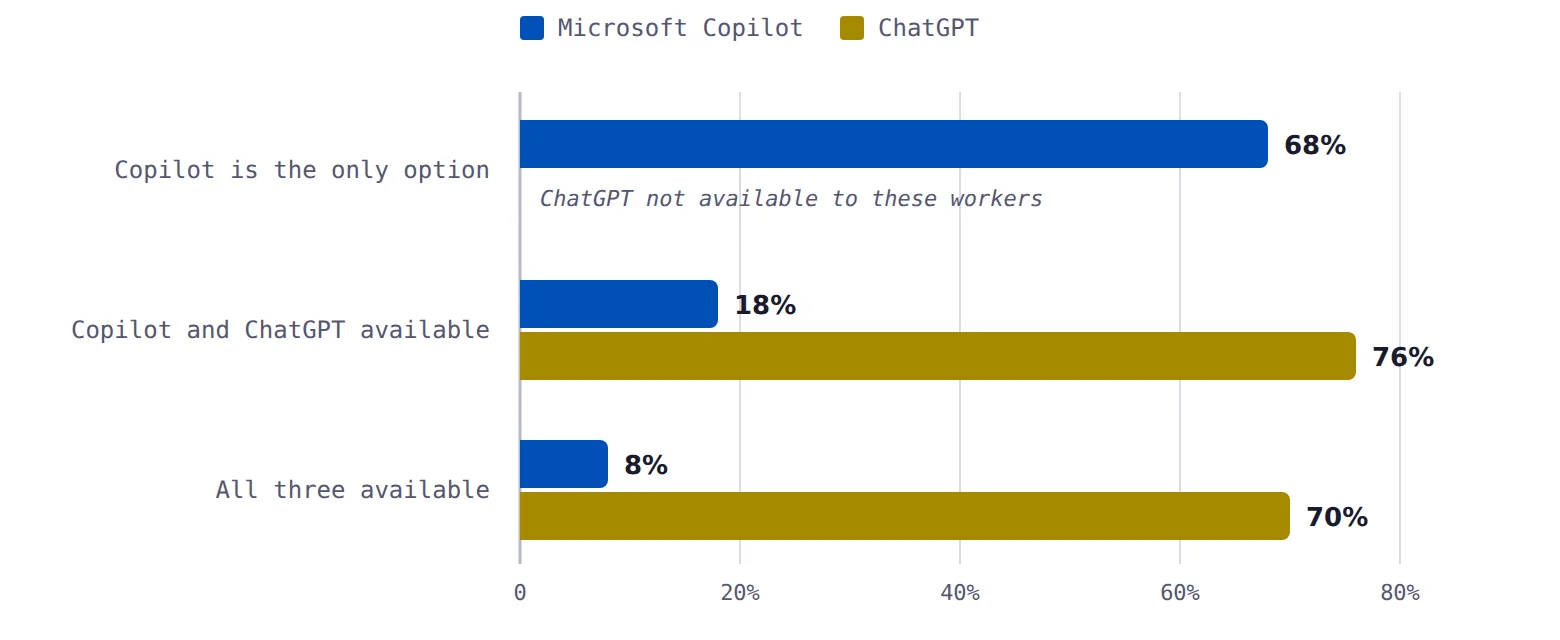
The same study found that of people given workplace access to each tool, 83 percent actually use ChatGPT regularly and 36 percent actually use Copilot. Roughly two in three Copilot seats never convert into real use.
Recon's own conclusion: "as worker choice expands, Copilot adoption collapses." For a corporate buyer that's a warning about wasted licences. For you, as somebody with unlimited choice, it's close to a direct answer.
Read the evidence as usage advice, not as a verdict. What the studies actually say is that Copilot works for email, summarising, and first drafts of structured text, and doesn't work for analysis, long documents, or anything where you need consistent quality you can evaluate. That's not "Copilot is bad." That's a job description. Use it for the first list and you'll be happy. Use it for the second and you'll conclude it doesn't work, because for that, it doesn't.
Should you pay for it?
Now the money. This splits cleanly depending on your situation, so pick your path.
You already have Copilot through work
Then stop reading about pricing and go use it. Two thirds of provisioned seats never convert into regular use, which means somebody already paid for something you're not touching. Reread Section 04, spend an hour finding where Copilot lives in Outlook, Word, and Teams, and build one habit: thread summaries before you read a long chain. That single habit is the one benefit that survived rigorous measurement. It's the highest-return AI hour available to you and it costs nothing.
You're deciding whether to buy
Then the question isn't "is Copilot good." It's "which tier, and does the thing it's actually good at match what I do all day." Keep reading.
The argument nobody makes, and should
Copilot's genuine advantage is grounding in an organisation's data. The value of that grounding is a function of how large and how unknowable the pile is. At 5,000 people with fifteen years of SharePoint, being able to ask "what did we tell this customer in 2019" is worth $30 a month without argument.
At one person, you are the pile. You know where things are. You wrote them. The advantage that justifies the whole product mostly evaporates when the organisation is a single human being.
What's left for a solo operator is Copilot as an in-app writing and summarising assistant. That's a real product. It's just an ordinary one, competing directly against tools that measurably do that part better.
What each path actually costs you
| Path | Real cost | Verdict |
|---|---|---|
| Free Copilot | $0 | Fine as a zero-cost floor. Being visibly hollowed out as features move to paid tiers. Not a reason to skip Claude or ChatGPT. |
| Microsoft 365 Personal | $99.99 a year | The best-value path, if you already need Office. Office alone used to cost $69.99 a year, so Copilot is roughly a $30 annual add-on. You also get a terabyte of storage. |
| Microsoft 365 Premium | $199.99 a year | Only if you'll genuinely use the Researcher and Analyst agents monthly. Otherwise Claude or ChatGPT does research work better for similar money. |
| Business Basic + Copilot Business | About $300 a year | Hard to justify at one person. You'd be paying a premium for grounding in a corpus of one. |
Buy it if
The strongest case, and the only one backed by measured evidence. If your inbox is your job, Copilot in Outlook pays for itself at consumer pricing.
Consultants producing Word documents and branded PowerPoint decks for clients. The 2026 brand kit and note steering features have no equivalent in a chat window.
Recaps and transcript search are among the highest-adopted features in every study, across every organisation that tried it.
Then the Copilot part of Microsoft 365 Personal is close to a free extra on a subscription you were buying anyway.
Skip it if
The entire advantage is integration with software you don't use. There's nothing here for you.
The evidence points the other way, and the model routing means you can't even evaluate it consistently from one month to the next.
Look at 68, 18, and 8 again. You'd be buying the tool people abandon the moment they have alternatives.
GitHub Copilot fell from 29 percent to 21 percent developer adoption in a year while Claude Code reached 39 percent globally, in a survey of 15,000 professional developers.
What about building agents with Copilot Studio?
People ask about this constantly, so here's the honest answer. Copilot Studio requires a work or school account. Personal Microsoft accounts are rejected outright. So before you build anything, you buy a business plan, make yourself a Global Administrator, create security groups, link an Azure subscription, configure billing policies, and approve your own agent into the store.
Then there's the money. The default way to build agents since August 2026 is a newer engine, and Microsoft publishes no price list for it. Their own documentation says only that credit costs "vary." It charges you from the moment you start building, not from when you publish, and since 1 September 2026 it charges inside trial and development environments too. The 30-day free trial won't let you publish anything at all.
You cannot forecast what it will cost, and the meter runs while you're still learning. For a business whose only real budget is its own time, that's disqualifying. If you want to build agents as a solo operator, there are tools with published prices.
One genuinely interesting detail: Copilot Studio's Skills use the same SKILL.md format Anthropic developed, and you can upload existing skill files directly. If you've already built skills for Claude, they're portable.
Getting more out of it
If you're going to use Copilot, these five habits come out of the evidence rather than the marketing.
Run a two-tool stack, not a one-tool stack
This is the shape the research supports and it isn't a compromise. Use Copilot for the Microsoft-native surfaces: inbox triage, meeting recaps, editing inside a document you already have open, building a deck from a document you already wrote. Use Claude or ChatGPT for thinking, drafting from scratch, analysis, and anything where you need to know what produced the output.
People who try to make one tool do everything end up disappointed with whichever one they picked. People who split the work by where the data lives get value from both.
Budget for verification, and mean it
60 percent of outputs in the Australian government trial needed moderate to significant edits. 22 percent of UK users reported seeing hallucinations. Some participants found that checking Copilot's work took longer than writing from scratch would have.
Copilot is a first-draft machine. If you price your time as though it produces final drafts, you'll conclude it saved you nothing, and you'll be right, but the mistake was yours.
Never trust it on numbers without checking
Worth repeating because it's the single most evidenced failure. Any figure Copilot produces in Excel gets verified before it goes anywhere near a client. This is not general caution. It's a specific, measured finding from a government evaluation.
Check the length before you trust a summary
Long documents get silently truncated with no warning. Anything past roughly 20 to 30 pages, ask a question about the final section specifically. If it can't answer, it never read that part.
Know your actual limits
On Microsoft 365 Personal and Family you get 60 AI credits a month for in-app AI, 30 minutes a day of voice, and 10 minutes a day of vision. Premium doubles voice to 60 minutes and vision to 15. The free tier's limits are unpublished. Knowing these stops you building a workflow that breaks on the 20th of the month.
The one habit worth building this week. Before you read any email thread longer than four messages, ask Copilot to summarise it first. Then read the thread. You'll be faster, you'll catch what matters sooner, and you're doing the one thing that survived every rigorous study anyone has run on this product.
What to do with all this
Microsoft Copilot is a good product being sold badly. The marketing promises a general intelligence for your business, which it isn't, and buries the thing it genuinely does better than anything else, which is knowing what's in your email.
The honest position, on everything above, is narrow and specific. If you already work inside Microsoft 365, Copilot at consumer pricing is a reasonable buy and the AI is close to a free extra on software you were purchasing anyway. If your employer has already bought you a seat, use it, because someone paid and two thirds of those seats sit idle. If you're on Google Workspace, or you already pay for Claude or ChatGPT and you're wondering whether to add a second subscription, the evidence says don't.
And notice what the good version of this looks like. Nobody who gets real value from Copilot is having long conversations with it. They're getting a summary before opening a thread, catching up on a document a collaborator changed, and pulling a deck out of a report they already wrote. Small, boring, repeated. That's what two hours a week actually looks like when someone measures it properly.
Here's your next step, and it takes about twenty minutes. Open whichever Copilot you already have. Go into Outlook, find the longest unread thread you've got, and ask for a summary before reading a word of it. Then do the same thing tomorrow. If that one habit sticks, you'll have captured most of the value this product has been proven to deliver, and you'll know from your own experience whether the rest of it is worth paying for.
That's a better test than any review, including this one.