Why AI-built automations usually fail
Ask any AI assistant to write you an automation file and you get one of four results. The file gets rejected on import. The file imports and quietly does nothing. The file works and you have no idea what to do next. Or, most subtly, you get exactly one workflow when the job honestly needed two or three working together.
None of those are failures of intelligence. They are failures of evidence. A model asked to write an n8n workflow has to produce a few hundred exact identifiers, each one differing by platform, by version, and sometimes by account. That is recall, not reasoning, and recall is where models are weakest. A name that is almost right looks completely right in a text editor and gets refused the moment it hits the platform.
The Automation Architect is built around that observation. It is a Claude plugin, sold through AI Black Magic, and it covers n8n, Make, Zapier, Power Automate, and GoHighLevel. Twelve skills and one background agent. What makes it different from asking Claude directly is not that it knows more. It is that it refuses to guess, checks its own output before you see it, and says no when the honest answer is no.
The claim it is built on: the file imports, it runs, and you know what to do next. Every part of the plugin exists to serve one of those three.
This article walks through all of it. What each piece does, what it produces, the specific things it will not do for you, and how to actually use it once it is installed. Some of the detail here comes from the plugin's own test runs, including the times it caught itself being wrong. Those are the most useful parts, so they are included rather than tidied away.
What you are actually installing
Twelve skills plus a specialist agent, all inside a single plugin. You never need to learn a skill name. You describe what you want in plain words and the right piece picks it up. The skills split into five stages, and you will rarely see all of them on any one build.
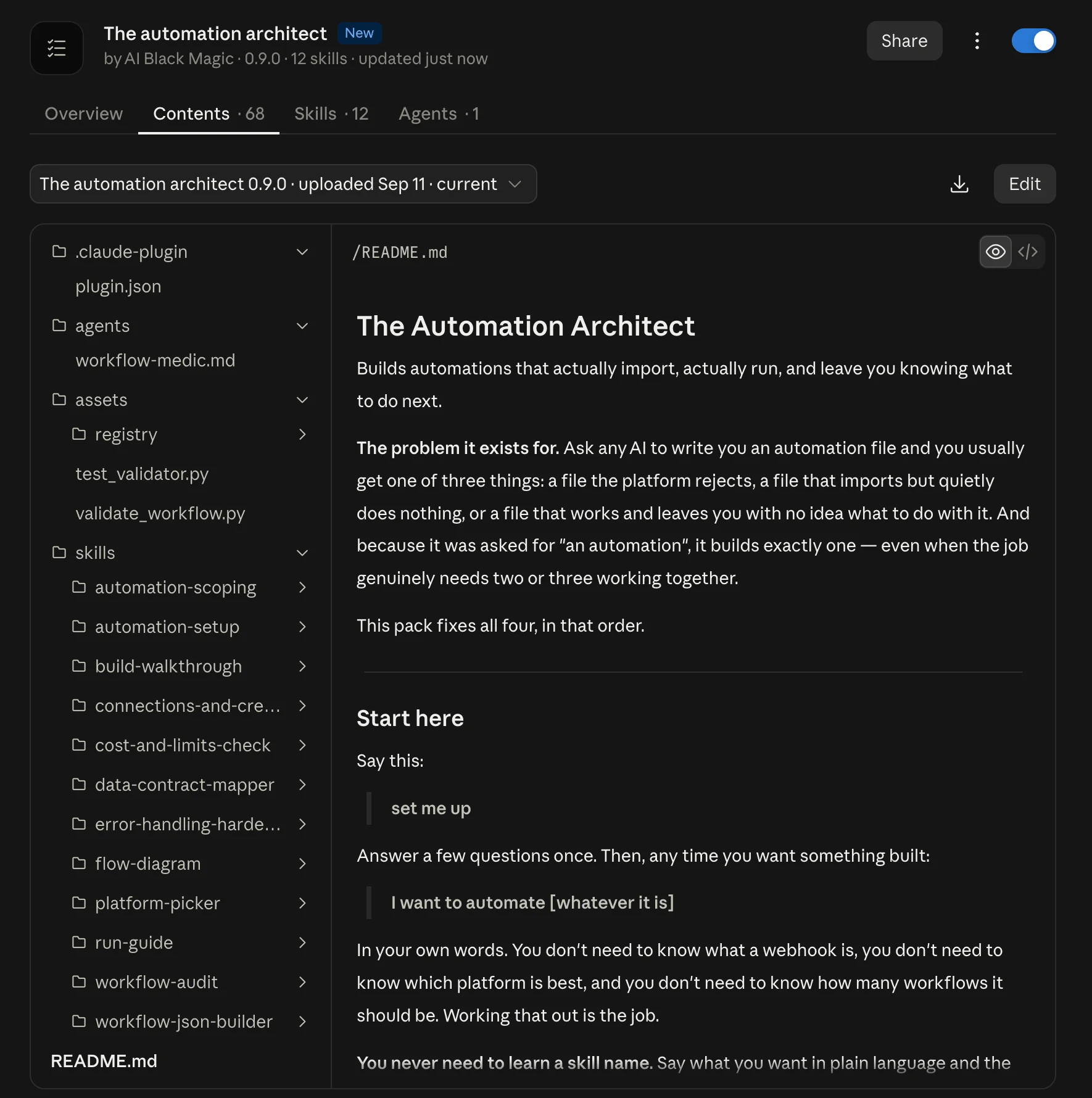
That last row matters more than it sounds. Most AI automation tools ask the model to review its own output, which produces confident approval of confidently wrong work. This plugin ships a validator script that runs over every file before you see any of it, plus registries of verified building-block names: 551 node types for n8n with the versions each one accepts, and 278 module identifiers for Make. Every Make name in that registry was observed in a genuine export rather than read out of documentation, for reasons that become clear in Section 06.
One more thing worth saying up front. Nothing needs to be connected. No accounts to link, no API keys to paste. Everything is produced in the conversation and as files. If you do have tools connected, the only difference is that files can be saved straight into a folder instead of handed to you in chat.
Setup, and the trick that makes the rest work
You run setup once. Say "set me up" and answer a handful of questions. Three of them decide almost everything that follows.
Which platform, and which plan
The plan is not a billing detail here. On three of the five platforms it decides what can be built at all. Zapier's import and export feature exists only on Team and Enterprise accounts. GoHighLevel has no workflow file import at any price. Power Automate takes a packaged zip rather than a bare file. n8n changes which building blocks exist depending on whether you are on cloud or self-hosted.
Setup asks properly, per platform, and refuses to guess. If you do not know your plan, it tells you where to look rather than picking one for you. A wrong guess here produces a file you cannot use, which is the exact experience the plugin exists to prevent.
The sample export, which is the whole design
This is the step people skim, and it is the single most valuable thing in the setup. You are asked to export or copy one workflow that already works in your account. Any one. However simple.
It tells me exactly what your version of the platform calls things. Without it I am working from memory, and that is where a file that looks right but will not import comes from.
One real export replaces recall with observation. It shows the exact building-block names your account uses, the shape your platform expects for a saved connection, the version markers, and the overall envelope a file needs to be accepted. From that point on, the sample beats every other source, including the plugin's own bundled registry. That rule is absolute and Section 06 explains what it cost to learn.
On secrets: exports routinely carry API keys and tokens. The plugin strips anything that looks like a key, token, password, or secret before storing anything, and tells you plainly what was removed. It never stores a live credential, even one you say is harmless.
The verdict, which is allowed to disappoint you
Once platform and plan are known, setup states which of four import routes you are on, in the first minute, in plain words.
| Route | What it means | Typically |
|---|---|---|
| Direct | Files import by paste or upload. Best case. | n8n, Make |
| Packaged | Files import wrapped in a container, and some connections need a paid licence. | Power Automate |
| Plan-gated | Import exists on the platform but not on your plan. | Zapier below Team |
| Built by hand | No file import exists at all. You get a build guide instead. | GoHighLevel |
If you are on a plan that cannot import anything, it says so directly. It does not soften that into "you may want to upgrade", and it does not present upgrading as the expected path. Most people should stay where they are and take the build guide. The pack works completely either way.
Why the same job can cost eighty times more on one platform
If you have not chosen a platform, or you suspect you are on the wrong one, say "which platform should I use for this".
Here is the thing almost nobody explains properly. These platforms are not priced differently. They count different things, and that is a structural difference rather than a competitive one.
- One counts a whole run as a single unit, no matter how many steps are in it. A four-step workflow and a forty-step workflow both count as one.
- One counts every module, once for every record that passes through it. Eight steps over two hundred records is sixteen hundred counted units, and nothing on screen suggests it.
- One counts every action that succeeds, and gives away the triggers and filters.
- One sells a seat and then meters what that seat may do.
- One is a subscription to a whole business system with the automation metered separately on top.
The consequence is the reason this skill exists. The same real workload can cost roughly eighty times more on one of these than on another, with neither vendor overcharging. So the plugin does not compare features. It works out the shape of your job from four numbers: how many steps in one pass, how many records one pass handles, how many times a month it runs, and whether the platform gets told or has to keep asking.
| Shape | Looks like | Cheap under | Expensive under |
|---|---|---|---|
| Step-heavy | Many steps, one record at a time | Per-run counting | Per-action counting |
| Record-heavy | Few steps, many records per pass | Per-run counting | Per-item counting |
| Run-heavy | Many runs, tiny each | Flat seats | Anything per-run at volume |
| Light | Small on every dimension | Everything | Nothing, so choose on other grounds |
During testing, the plugin was given two workloads for the same imaginary business. The first was twelve steps, one record at a time, three thousand runs a month. The second was six steps over four hundred records, thirty times a month. The second job does roughly a hundred times less actual work, and on a per-item platform it costs twice as much. The verdict for the first was "stay where you are". The verdict for the second was "not on this platform as described".
The answer is usually "stay". Switching costs learning a second tool, rebuilding what already works, running two subscriptions during the overlap, and being a beginner again at the exact moment something breaks. The plugin recommends moving only when the difference is order-of-magnitude, not marginal. A switch that saves twenty percent is a fortnight spent to save twenty percent.
There is also a third answer it gives freely: use both. Keep the business system you already run on and put the awkwardly shaped part on a general automation platform beside it. That is a standard pattern, not a compromise.
And it will never quote you a current price as fact. Prices and tiers on all five of these move more than once a year, and one of them has already changed the name of its billing unit since these things were last written down. So the plugin reasons in units and tells you to check the current rate against your own plan.
The five questions, and the one nobody asks
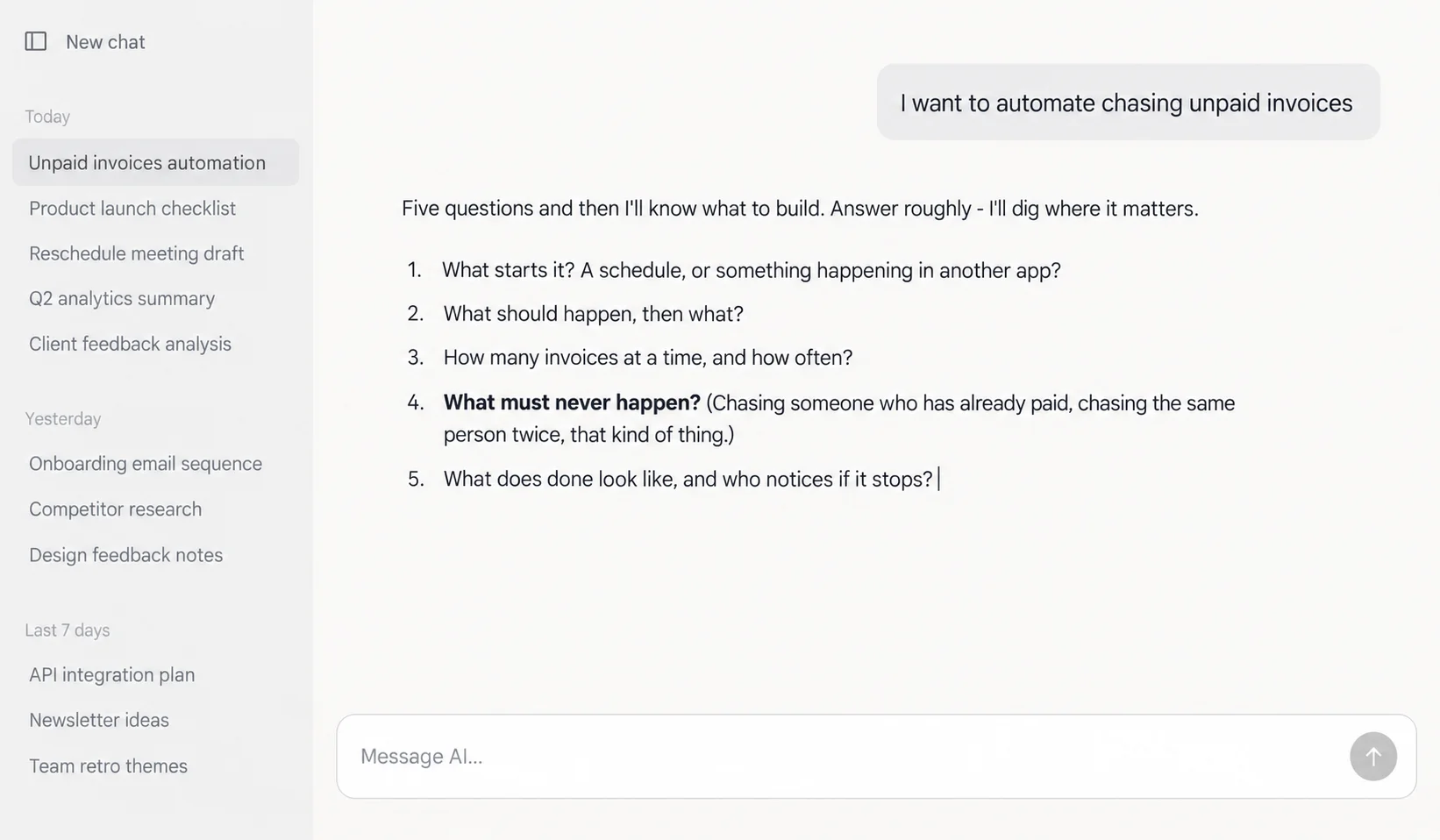
This is the part you use every single time. Say "I want to automate chasing unpaid invoices", or whatever your version of that is, in your own words. You do not need to know what a webhook is.
You get five questions, asked conversationally rather than as a form:
- What starts it? An event, a schedule, a form, a file arriving.
- What should happen, then what? You ramble, it reads the steps back as a numbered list and asks what is missing. People reliably leave out the step they do without thinking.
- How many at a time, and how often? This decides both the architecture and the bill.
- What must never happen?
- What does "done" look like, and who notices if it stops?
Question four is the one nobody asks, and it is the one that changes the design. Double-charging someone. Messaging the same lead twice. Missing a record silently. Mailing the wrong list. The answer decides whether your automation needs a memory of what it has already seen, an approval step, a rate limit, or a guard against running twice.
Question five has a common answer that people are embarrassed to give: "nobody would notice for a week". That is a real answer and it changes what gets built. It usually means you need a separate small workflow whose only job is to notice silence.
Two checks before a single line is written
Can your platform actually do this? The plugin runs your description against your platform and plan first, because that changes the design. Four outcomes: clear, needs reshaping, needs a second tool for one part, or wrong platform for this job. Discovering at import time that your plan allows two active automations and this needs three is a bad afternoon.
How many workflows does this really need? The default is one, deliberately. Splitting has a real cost: more to import, more to connect, more places to break. But some jobs genuinely need a fast receiver and a slow processor, or a shared piece called from three places, or a splitter and a per-item worker so one bad record does not kill the rest. When it splits, it names the reason:
This needs two, not one. Your webhook has to answer within seconds and the enrichment step takes a couple of minutes, so a single workflow would time out under load. One catches and parks it, the other works through the queue.
What comes out is a build plan: the workflow inventory, the data contract between them, the feasibility findings, the guards against what must never happen, and anything unknown marked as unknown rather than filled in with something plausible.
The file, or the guide
Say "build the file" and one of two things happens, decided by the import route from setup.
If you can import: the file builder
Six passes, in order. Every step gets resolved to a real identifier, sample first and registry second. The skeleton gets laid out. Everything gets wired. Then positions get set on the canvas, which is not cosmetic: a file without them opens as a pile of overlapping boxes in the top-left corner, and anyone non-technical reads that as broken before they have run it once. Then every credential becomes a placeholder. Then the settings get filled in from the plan, with every unknown left as a visibly blank field.
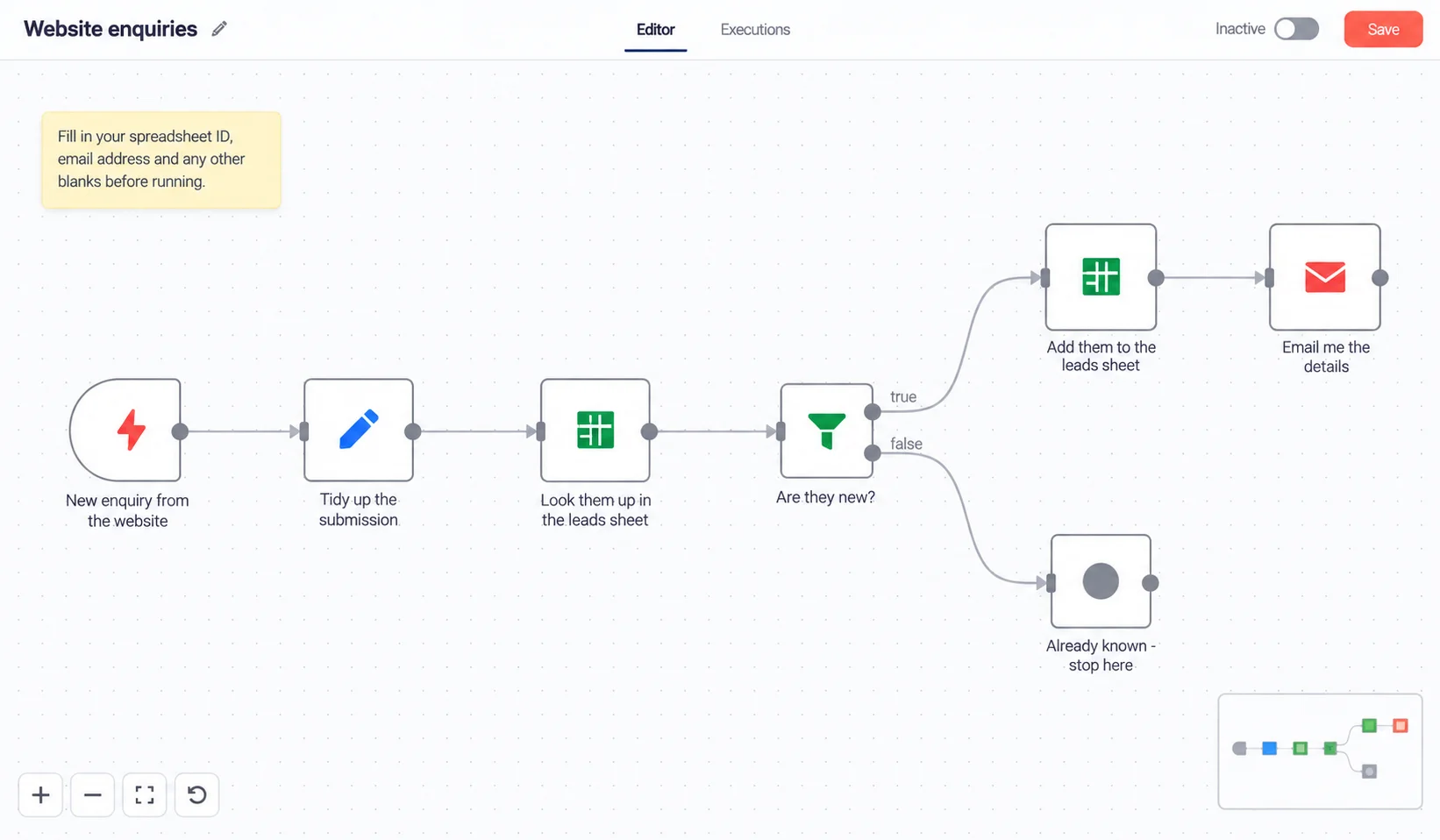
Then the validator runs. Any error and the file is not handed to you. Not with a caveat, not with an apology. The cause gets fixed and the file gets generated again from scratch, because a patched file only proves that it could be patched, and you will not have Claude standing behind you next time.
No credential ever goes in a file. Not a key, not a token, not an account identifier carried over from your sample. The validator errors on anything that looks live and there is no override. You pick your own accounts after import.
The failure that shaped the whole approach
This is worth telling because it is the argument for the sample export in one story. During testing, a generated Make blueprint failed on import. Two module names had come from the plugin's own bundled registry. They passed the validator cleanly. And they did not exist. The correct names came from a two-minute throwaway export from a real account.
The lesson written into the plugin afterwards: a registry hit is not verification, and a clean validator run says nothing about whether a name is real. The Make registry was subsequently rebuilt from 57 names to 278, every one observed in a genuine export, with names that could not be observed removed rather than kept as plausible. The n8n registry went from 110 names with no version data to 551 with the accepted versions for each, parsed from the vendor's own published package.
If you cannot import: the build guide
On GoHighLevel, and on Zapier below Team, there is nothing to import. So you get a guide instead, and it is written as the main event rather than a consolation prize. Every screen, every field, every value, in order, in the words your platform actually uses.
Before writing a single step, it runs an ambiguity check over the plan looking for the places you would stall. Any point where the interface offers three similar options gets one named answer, plus half a sentence on what the tempting wrong pick would do instead. If a decision is knowable now, you get asked in one message rather than left stuck at step fourteen. A guide that contains a question is a guide that hands the decision back at the moment you have least context.
How seriously this is taken: the Zapier reference was checked click by click against current screen recordings, and eighteen claims in the first draft came back wrong. One of them told readers to rename their Zap by clicking the name at the top left. The name is in the middle of the top bar. The top left is a button that navigates out of the Zap you just created, which to a beginner looks exactly like the tool eating their work. The GoHighLevel pass found fourteen wrong out of forty claims, including which side of the screen the actions panel is on.
Both passes had the same root cause: labels taken from help-centre articles rather than from current footage. Vendor documentation goes stale faster than vendor screens change. That is why the plugin's rule is now "say where you saw it, or do not say it".
The three documents that get it running
A file is not an automation. Three more documents close the gap, and each is produced by its own skill so you get the real version rather than a thin one.
The setup checklist
Say "what do I need to connect". This reads the generated file itself rather than the plan, because the plan says "Google Sheets" while the file knows you need one specific kind of Google connection and that a web address has to be copied out of step one and pasted somewhere else entirely.
It sorts what is outstanding into four kinds, because each is solved by a different person on a different timescale: an account to connect, something that must exist first, a value only you have, and somebody else's job. That fourth kind decides the order of the whole list.
Anything with someone else's name on it goes first, however small. Not because it matters most, but because it is the only kind with a queue attached. An approval requested on day one and granted on day three costs nothing if you did everything else in between.
It also avoids a trap that inflates most checklists. A step advertises several ways to authenticate, and reading that menu as a list of requirements produces a checklist several times longer than the truth. On one test file the naive reading needed seven accounts. It actually needed two.
The first-run guide
Say "is it safe to run". This one works out the blast radius before anything else: every step in the file that sends, writes, creates, or charges. Then it gives you one of four verdicts, and the fourth is a genuine stop.
I would not switch this on yet. Its first run would look at every unpaid invoice you have ever had, not just the recent ones, and email all of them. That needs a date limit before it runs at all.
That backlog problem catches almost everyone. A scheduled automation's first run does not see "the new ones". It sees everything that qualifies, and everything that qualifies includes years of history unless somebody decided otherwise. The plugin asks explicitly how far back the first run should look and never lets a default answer it quietly.
It also refuses to write the words "this is only a test" as reassurance, because on at least one of these platforms the test facility fires real messages to real people. It tells you what the run will actually do, then how to start it, then what a good run looks like, and what a silent run looks like, which is the failure most often mistaken for success.
The diagram and the worked example
Say "show me how it works". You get a picture of the automation, and then the half that actually makes it click: one record walked through step by step, showing what the data looks like at each stage and which way it went at every decision.
You get two traces, not one. The happy path, and one that gets stopped by your safeguard, so you can watch the safeguard work. A diagram tells you the shape of a machine. A trace tells you what happens to your data, in your own vocabulary, and it is the only document in which a design flaw becomes visible. Walking a record through surfaces "by this point we no longer have their email address" in a way that staring at boxes never does.
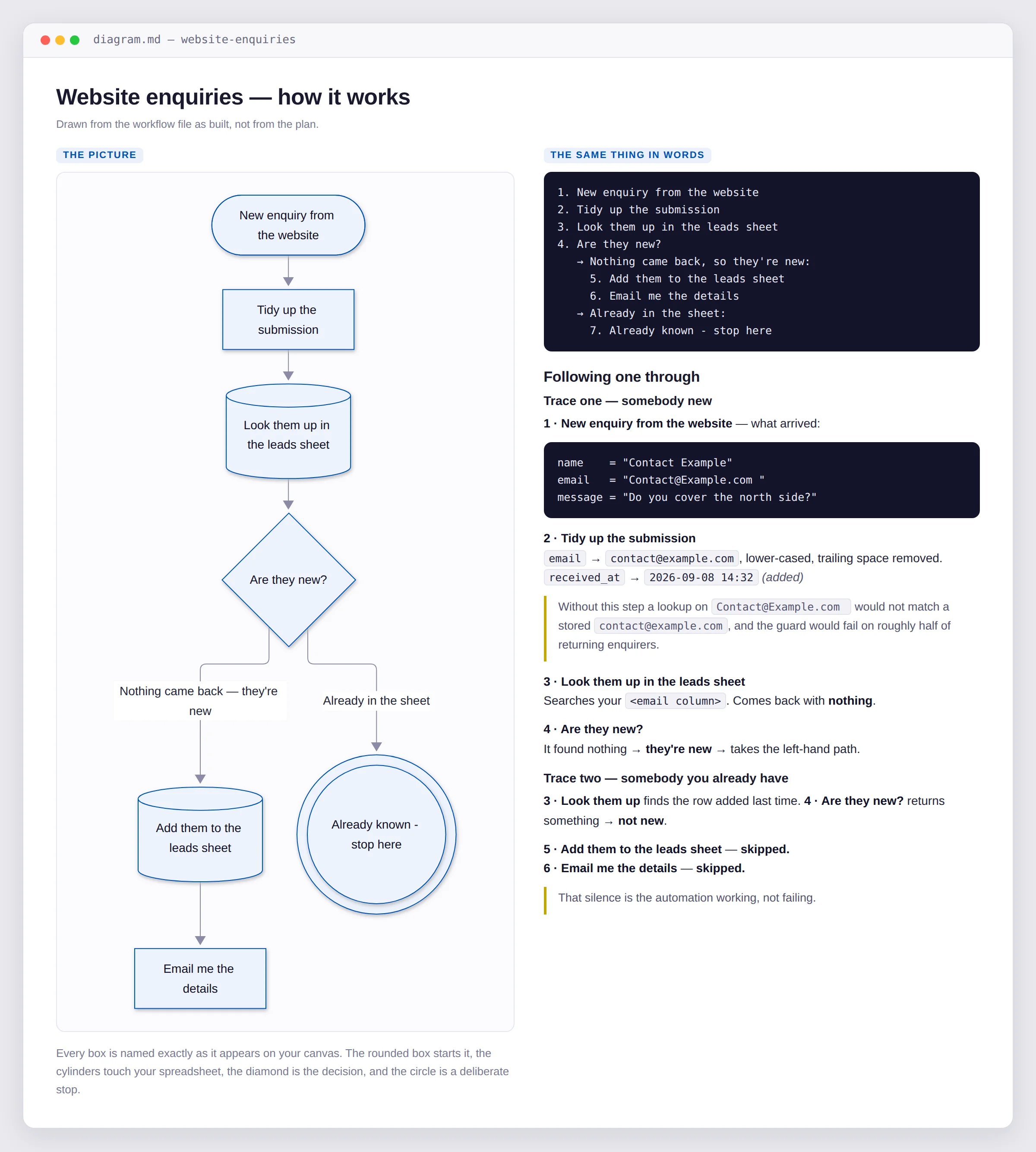
And if nobody has established what your fields are actually called, it says so rather than inventing a trace. A trace is persuasive precisely because it looks like evidence, which is what makes a fabricated one worse than none.
What it costs, and what breaks at 3am
Cost and limits
Say "how much will this cost". Two questions get answered, and the second comes first because it can stop the build. Will your plan run this at all? Then, what does it cost per month?
Ceilings go first: how many automations may be switched on, how long one run may take, how often it may check, how many steps in one. A ceiling is a design finding, not a cost finding. Being told what something costs and then, three paragraphs later, that it cannot run is being told those two things in the wrong order.
The counting is done in your platform's own unit and it counts billable work rather than boxes on a canvas. Routing and filtering are free on some platforms and not others. Triggers are free on some. Failed actions bill on some and not others. It also counts failures, because retries re-run everything before the failing step.
Four things it will never invent: a volume nobody measured, a currency, a current price, or a billing model nobody checked. That last one was added after a research pass found nineteen of twenty-six billing claims were technically true and misleading in practice. So where a verdict leans on an assumption, the report names the assumption out loud.
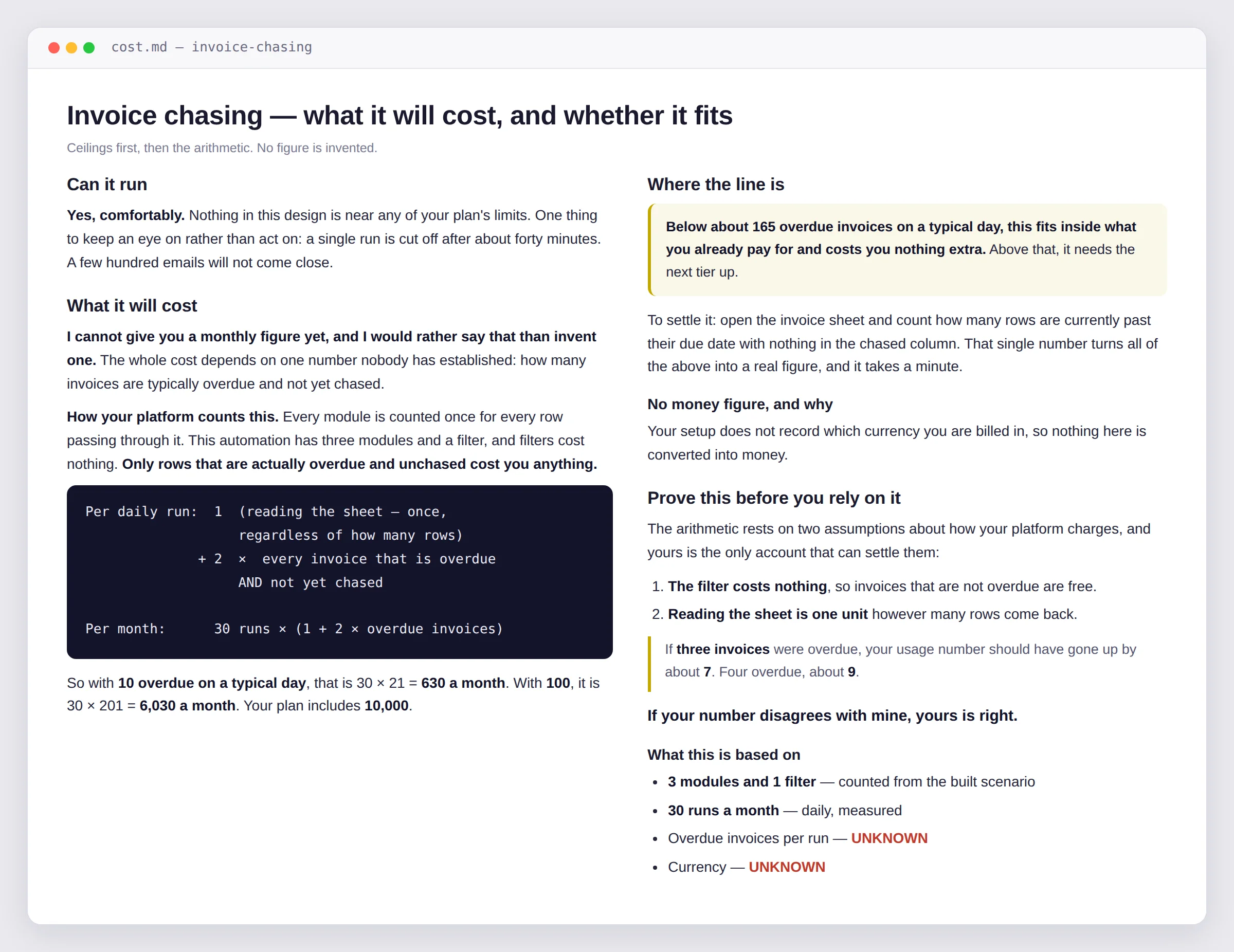
Where the volume is unknown, you get the break-even instead of a number. From a real test run: "below about 165 overdue invoices on a typical day, this fits inside what you already pay for and costs you nothing extra". Then it tells you the one thing to count, which takes a minute. And it predicts what a single run should cost so you can run it once and check the counter on your own usage page.
Where your measurement disagrees with the estimate, yours is right. Your usage page is something your platform produced. That beats anything the plugin believes about pricing.
Hardening
Say "what happens if it fails". Two questions: what breaks this at three in the morning, and would anybody find out.
The second answer is almost always no, and saying that plainly is most of the value. None of these five platforms reliably tells anyone that an automation has stopped, and several switch it off after sustained failure without a word, which converts a loud problem into a permanent quiet one. So hardening usually means two changes: route failures somewhere a human will see them, and where the stopping is itself the risk, add a separate thing that notices silence. An error route catches a run that failed. It cannot catch a run that never started.
But the part that matters most is the guard against running twice. A retry is not a fresh start. Every step before the failure runs again, so anything that sent, charged, or created does it again. The recovery causes the incident.
This was proven rather than argued. On a live instance, five records with one bad one: the un-hardened workflow ended in error with the final step never running and zero records written. The hardened version reported success, wrote four records, and set the bad one aside. Then the send step, run twice: unguarded it sent, then sent again. Guarded it sent, then skipped and recorded that it had already sent. The difference is one condition and one write.
The ordering rule everything rests on: record that you are about to do the irreversible thing before you do it, not after. Recording afterwards leaves a window where the send happened and the record did not, and a retry lands in exactly that window, because that is where the failure was.
One courtesy worth knowing: if you have already imported and configured the automation, a replacement file costs you your connections and every value you filled in. So it asks first, and where you have configured it, delivers the changes as targeted instructions instead.
The data problem nobody checks
Say "what if the field is empty". This is the least glamorous skill in the pack and possibly the most valuable, because of one finding.
Nothing errors. Leaving a field's behaviour undecided is not a neutral state. The platform decides on your behalf and its decision is almost always to write something wrong and carry on. Measured on a real instance, in a run that reported success throughout:
| What the automation asked for | What actually landed |
|---|---|
| A field that is missing entirely | null |
| A field that is present but empty | "", and these two are not the same |
| A name in a greeting, when missing | Hello ! |
| Any arithmetic involving a missing field | NaN, the literal word, written into your spreadsheet |
| An object dropped into a text field | {"a":1}, stringified into the cell |
None of that raised an error. So the choice is not between deciding and not deciding. It is between deciding and letting the platform decide badly.
The skill works from your real records rather than from a description, because the awkward cases only show up in real records. Then for every field that crosses a boundary it records one of five behaviours: stop and report, skip this record, use a stated default, derive it from something else, or carry on regardless. That last one is a legitimate choice and gets recorded as one, because the difference between deciding to ignore a missing middle name and never having thought about it is invisible in the automation and enormous in the contract.
It caught the plugin's own output. A test workflow referenced body.name, body.email, and body.message. The twenty real form submissions carried Full Name, Email Address, and Message. Zero of three matched. Every value would have resolved to null, the sheet would have filled with blank rows, the notification would have read "New enquiry from ()", and nothing would have errored. It also found that 7 of those 20 enquirers had no usable email address at all.
That is the strongest argument in the whole pack for handing over real data rather than describing it. It is only findable by comparing the file against actual records.
Automations you already have
The audit
Say "can you check this workflow" and paste in something you inherited from a contractor, downloaded as a template, or built yourself a year ago. What comes back is a triage, not a list. Findings sort into four severities, and the response to each is completely different.
| Severity | Meaning | When to act |
|---|---|---|
| Dangerous | It can leak a credential, or do irreversible damage twice | Now, before anything else |
| Fragile | It will break, and probably without telling anyone | Soon, worst first |
| Expensive | It works and costs more than it needs to | When the number justifies it |
| Merely messy | It works, costs fine, and is hard to read | Usually never |
The hardest and most valuable thing this does is tell you what to leave alone, with the same confidence as the things to fix. An audit that lists forty issues and recommends a rewrite is easy to produce and almost always wrong. You have a working automation. The most likely outcome of tidying it is that it stops working.
It is thirty steps on one canvas with names like "HTTP Request3", and that is genuinely unpleasant to read. It also works, and it costs nothing. I would not touch it until you next need to change something, and then rename as you go rather than as a project.
It also asks one question before starting: what do you believe this does? The gap between that answer and what the file actually does is frequently the most valuable finding in the whole audit, and it is only available before you have been told. And it will not give you a score, because a number invites comparison and hides which severity the points came from. One dangerous finding and thirty cosmetic ones do not average into "mostly fine".
The medic
The one background agent in the pack. Its boundary is narrow on purpose: a file already exists and it needs to change. Either it is misbehaving, or you want it to do something extra. Say "it's not working", or "it's sending duplicates", or "can you make it also send a Slack message".
It diagnoses before it touches anything, and the distinction it leads with is the one most people skip.
| Symptom | Usually not the file |
|---|---|
| Worked for weeks, stopped suddenly | A connection expired, or the other app changed |
| Fails only on some records | The data, not the logic |
| Fails at the same time every day | A rate limit, or a scheduled job elsewhere |
| Never worked at all | Now it probably is the file |
| Stopped after you edited something | Compare against the last known-good version first |
Changing the file to solve a problem that lives outside it produces a file that is now also wrong. So the medic will happily tell you the file is fine and the problem is on your side. It changes the least that solves the issue, preserves your edits and your names, re-runs the validator before handing anything back, and gives you three things every time: the corrected file, what changed in plain language, and what to do next.
Using it, start to finish
You never need a skill name. Here is what a first build actually sounds like.
You: set me up
Answer the platform and plan questions, paste in one working export, name what you already have connected. Two or three minutes.
You: I want to automate chasing unpaid invoices
Five questions. Give real answers to "how many at a time" and "what must never happen". You get a build plan back.
You: build the file
Or "give me the steps" if you are on a platform with no import. You get the file plus a validation report, or the guide.
You: what do I need to connect
You: is it safe to run
You: show me how it works
You: how much will this cost
You: what happens if it fails
Those last five are the launch kit and you can take them in any order, though the checklist before the run guide saves a wasted attempt. A few more phrases that land somewhere useful:
One habit worth building: do not skip the sample export at setup, and do not describe your data when you could paste twenty real rows of it instead. Those two inputs are what separate a file that imports from a file that looks right.
What it will not do
Worth saying plainly, because the refusals are the point rather than a limitation.
- It will not invent a fact about your business. If a number, a name, or a limit matters and is not known, you get asked. If you genuinely do not know, it stays a marked blank rather than a plausible value. A guessed record volume produces a confidently wrong cost estimate you have no way to check.
- It will not put a password or key inside a file. The validator refuses to hand over a file containing one, and there is no override.
- It will not build you a file you cannot import. Not as a reference copy, not "for later". Where importing is not possible you get a build guide and it says so up front.
- It will not quote you a price as fact. You get the arithmetic in your platform's units and a pointer to check the current rate.
- It will not ask you to take the cost estimate on trust. It names what it assumed and shows you how to check it against your own usage page in under a minute.
- It is not a substitute for reading what it built. Which is exactly why everything comes with a plain-language explanation.
The plugin ships at version 0.9.0 rather than 1.0.0, and the reason is consistent with everything above. Its files have been imported into real n8n and real Make accounts first time, an automation was run end to end on a live instance with the guard proven to work, and every workflow it ships validates clean. What has not been proven is whether a complete stranger can install it and reach a working automation with no help at all. That gate needs an actual stranger, so the version number says so.
Where to start
If you already run automations, start with the audit. Paste in the oldest one you have, the one you inherited or half-remember building, and ask what it actually does. That single answer is usually worth the install on its own, and it costs you nothing but the paste.
If you are starting fresh, run setup, then pick the smallest annoying thing you do by hand every week. Not the ambitious one. The small one. Get it built, connected, run safely once, and traced on paper so you can see what happened to your own data. The second automation takes a fraction of the time because the sample export and the setup are already done.
And there is one question worth carrying out of this article whether or not you ever install the plugin. Before you automate anything, ask yourself what must never happen. Not what should happen. What must never happen. That answer decides whether your automation needs a memory, an approval step, or a guard against running twice, and it is the difference between something that works in a demo and something that is still working in week twelve.
The habit that outlives any tool: before you trust an automation, run it twice with the same record on purpose. One clean run only ever proves the happy path. The second run is what tells you whether your safeguard exists.