Most AI tools answer questions. Meta's Muse does the work. It clears your inbox, watches prices, plans your week, and turns the posts you've saved into something useful, and it keeps going after you close the app.
Meta launched Muse on 8 September 2026, and it's the most capable AI product Meta has put in front of ordinary users. It also comes with conditions. The agent only works in the US for now, it needs real access to your accounts to be useful, and it's better at some jobs than others. None of that is a reason to ignore it. It's a reason to start the right way.
That's what this tutorial is for. You'll learn what Muse is, what it's good at, why it deserves your time, and exactly how to start, wherever you live. Then we'll put it side by side with the AI agents, everyday chatbots, and image tools you might already use, so you know where Muse has the edge and where something else is the better pick.
Two paths run through this tutorial. If you're in the US, Section 04 is your setup. If you're anywhere else, Section 05 shows you what to use today and how to get ready. Everything here was checked against Meta's own documentation and independent reporting on 17 September 2026.
Muse in two minutes
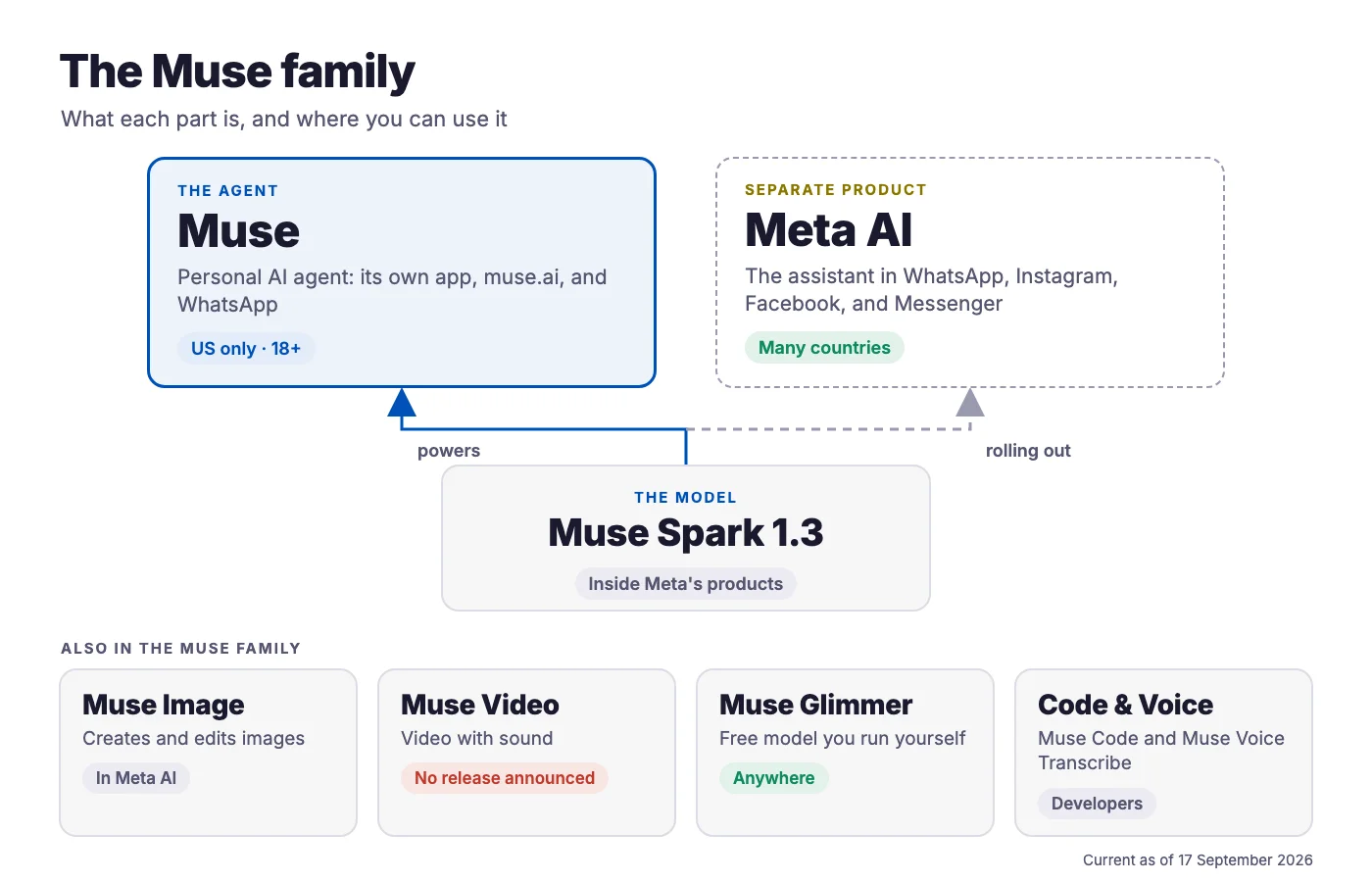
Meta uses the name Muse for two different things, and separating them now will save you a lot of confusion later.
An app and website where an AI works on your behalf. It has its own computer in the cloud, uses the web, connects to your accounts, and asks before doing anything important. US only for now, for users 18 and over.
The AI models behind Meta's products, including Muse Spark, which Meta is rolling out inside Meta AI. Several of these work far beyond the US, which matters if the agent isn't available to you yet.
Here's the whole family on one page:
| Name | What it is | Can you use it? |
|---|---|---|
| Muse | The personal AI agent, with its own app and website | Yes, in the US, if you're 18 or older |
| Muse Spark | The model behind the Muse agent and, as it rolls out, Meta AI. The current version is 1.3 | Through Meta AI and the agent |
| Muse Image | Image creation and editing | Yes, in Meta AI. Instagram Stories effects are US only |
| Muse Video | Video generation with sound | No general release announced yet |
| Muse Glimmer | A free model you download and run on your own computer | Yes, anywhere, with enough memory |
| Muse Code | A coding agent for software developers | Yes, in beta |
| Muse Voice Transcribe | Speech-to-text | Through dictation in Meta AI for Mac |
Meta AI is not the Muse agent. Meta AI is the assistant already built into Facebook, Instagram, WhatsApp, Messenger, and the Meta AI app. Meta is moving it onto Muse Spark, so the two are related, but they're separate products. Opening the Meta AI app does not give you the agent. The agent lives in an app called "Muse from Meta", at muse.ai, and inside WhatsApp.
What Muse can do for you
Here's what makes the Muse agent different from a chatbot, in plain terms.
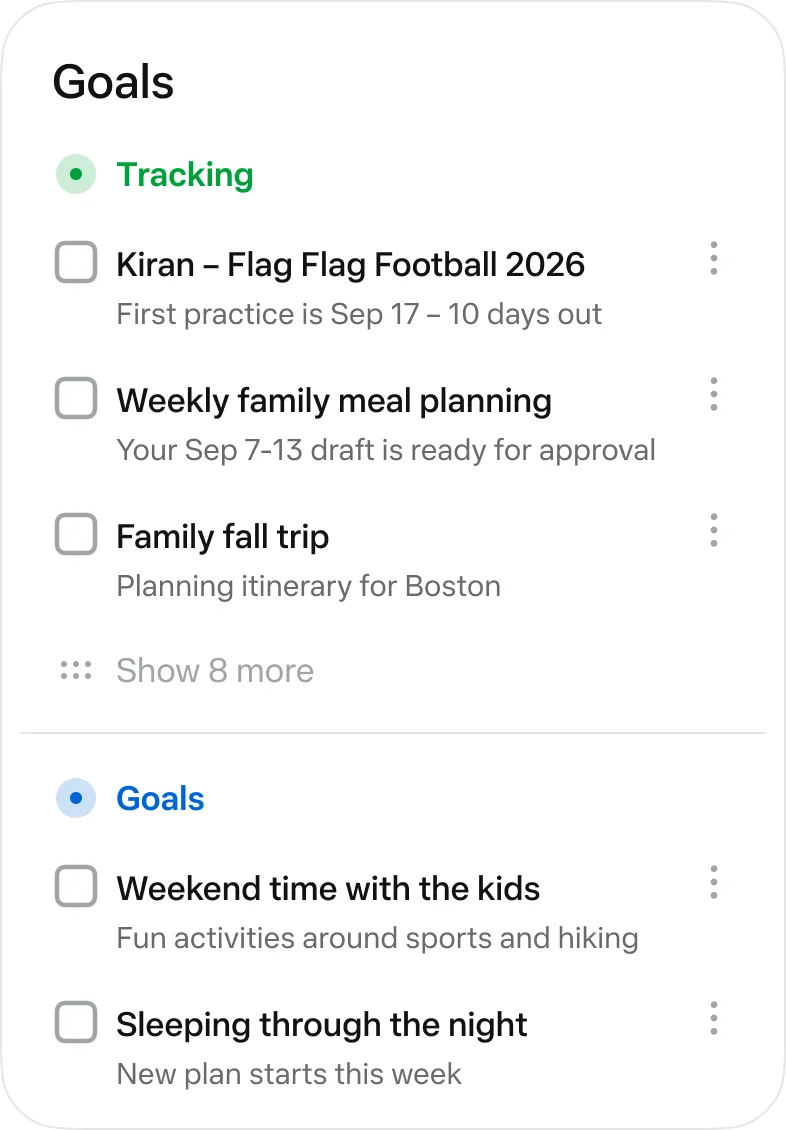
Goals keep running in the background after you close the app, alongside scheduled tasks and reminders.
It has its own browser, so it can research, compare, and fill in forms on websites that have no special integration.
Gmail, Google Workspace, Apple Health, Android text messages, and your Facebook, Instagram, and Threads accounts. It can also build a connector for other services with a public API.
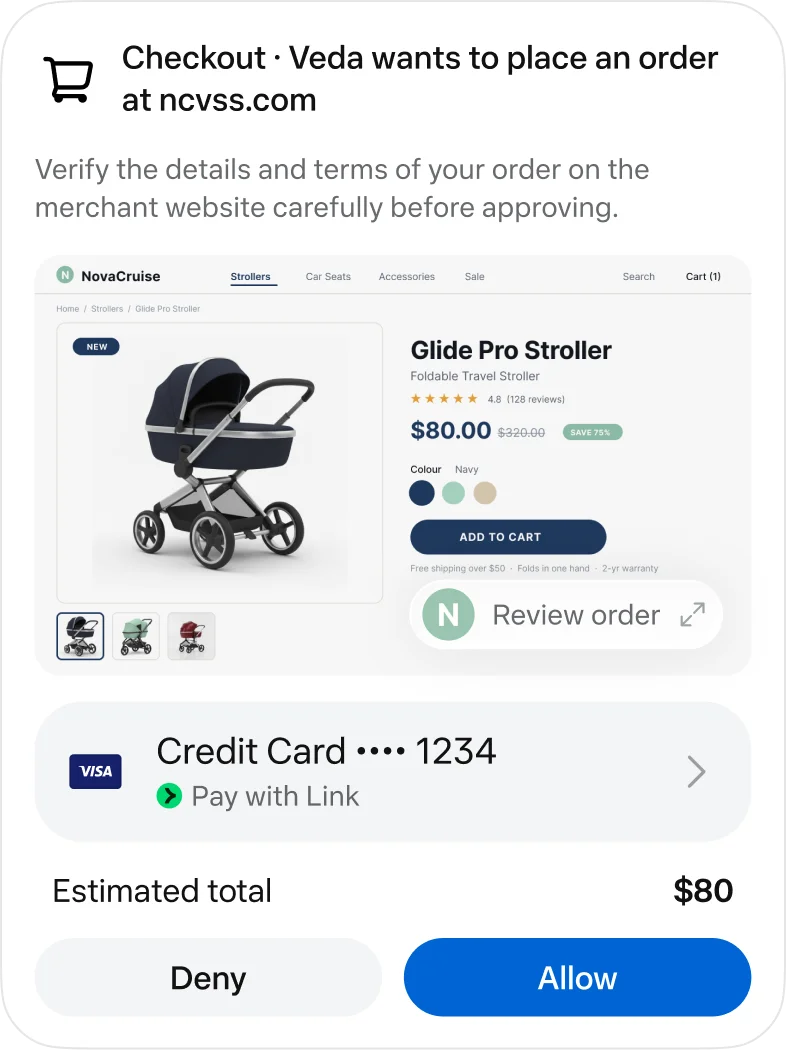
Checkout runs through Link by Stripe, which issues single-use card numbers for new merchants. Shop Pay and 1Password are "coming soon".
Its memory is a file called MEMORY.md that you can read and edit, and you can tell it to forget things.
PDFs, Word documents, spreadsheets, images, and small web tools, saved to a Library you control.
Meta's own examples show the idea. Turn a recipe reel you saved on Instagram into a grocery list, suggest a dinner party menu that respects your friends' dietary restrictions, and send the invites. Negotiate a lower bill. Track your spending and flag subscriptions you forgot about. Those are Meta's claims, so here's what happened when independent testers tried it.
Where it shines, and where to keep an eye on it
The Verge's tester cleared thousands of promotional emails. MBI Deep Dives searched four Gmail accounts well. Engadget sorted saved Instagram recipes and built a restaurant guide by city.
Flight price alerts, a daily 5 AM inbox triage that ran as a scheduled task, and a PDF newsletter one reviewer rated above rival agents' output.
Checkout pages and logins trip it up. One booking stalled at payment, a food order failed in a login loop, and some shopping prices were wrong.
Gizmodo's tester got the tasks done, but quality varied and complex jobs needed several attempts.
The rule of thumb. Give Muse reading, sorting, searching, and watching jobs freely. Supervise anything that spends money or sends something in your name. Meta's own app says it plainly, according to Engadget: "Muse may take unexpected actions. Monitor it carefully."
Why it's worth your time
There's no shortage of AI tools competing for your attention. These are the reasons Muse earns a place on the list.
1. It's a real agent with a free tier
The agents most like Muse, Google's Gemini Spark, Claude's agent tools, and Microsoft's browsing agent, all need a paid plan. Muse gives you a weekly allowance for free, which Mark Zuckerberg put at 100 million "Muse tokens". Gizmodo's tester used about 11% of it in a heavy session of creative and coding work. For most users, that's plenty of room to find out whether an agent fits their week before spending a cent.
2. It lives where you already are
You can message Muse inside WhatsApp, and it can read your Instagram saves and your Facebook and Threads accounts through Meta's Accounts Center. If your business or your content already runs through Meta's apps, that's a head start. The recipes, ideas, and inspiration you've been saving for years become raw material it can work with.
3. It keeps working after you close it
Chatbots stop when you stop typing. Muse is built around goals that run in the background: a morning inbox summary, a price you want watched, a weekly report. That's the difference between a tool you visit and an assistant that's on duty.
4. Its safety design is out in the open
Meta has published how Muse is built. Each user gets a private computer in the cloud. A separate AI, which Meta calls the Sentinel, has to approve connector actions and internet requests. Passwords sit in a store the model never sees, and Muse asks before important actions like sending an email or buying something. That doesn't make it risk-free, and Meta says so itself. But you can see what you're trusting, which isn't true of every AI product.
5. It hands you finished work
Muse doesn't just tell you things. It makes PDFs, documents, spreadsheets, and small interactive tools you can keep, forward, and reuse. A weekly briefing that arrives as a tidy PDF is worth more than a long chat reply you'll never scroll back to.
6. The rest of the family is useful right now
Even if the agent isn't available to you, Meta's AI is. Meta AI is free inside WhatsApp, Instagram, Facebook, and Messenger in many countries, and Meta is moving it onto Muse Spark, starting in the US. Muse Image lets you create and edit images for free in the Meta AI app and on meta.ai. And Muse Glimmer, a model you can download and run privately on a powerful computer, is free under a licence that allows business use. Section 05 shows you how to start with Meta AI today.
Path A: Start using Muse in the US
If you're in the US, setup takes about fifteen minutes. The order matters, because two of Muse's defaults aren't what a cautious person would choose.
What you need
- To be in the US and 18 or older. Both are firm requirements.
- A Meta account. You can create one with an email address or phone number. You don't need a Facebook or Instagram profile.
- A device. An iPhone on iOS 18 or later, an Android phone, or any web browser.
One unresolved detail: TechCrunch reported that Muse requires a payment card to get started, while Engadget's walkthrough describes adding a card only for purchases. You'll find out at sign-up.
The fifteen-minute setup
- Get the right app. Search for "Muse from Meta" in the App Store or Google Play, or go to muse.ai. Not the Meta AI app.
- Decide about training. Go to Settings > Data controls. The "Help improve our AI models" toggle is on by default. Switch it off if you'd rather your chats didn't train Meta's AI. Turning it off covers your past chats too.
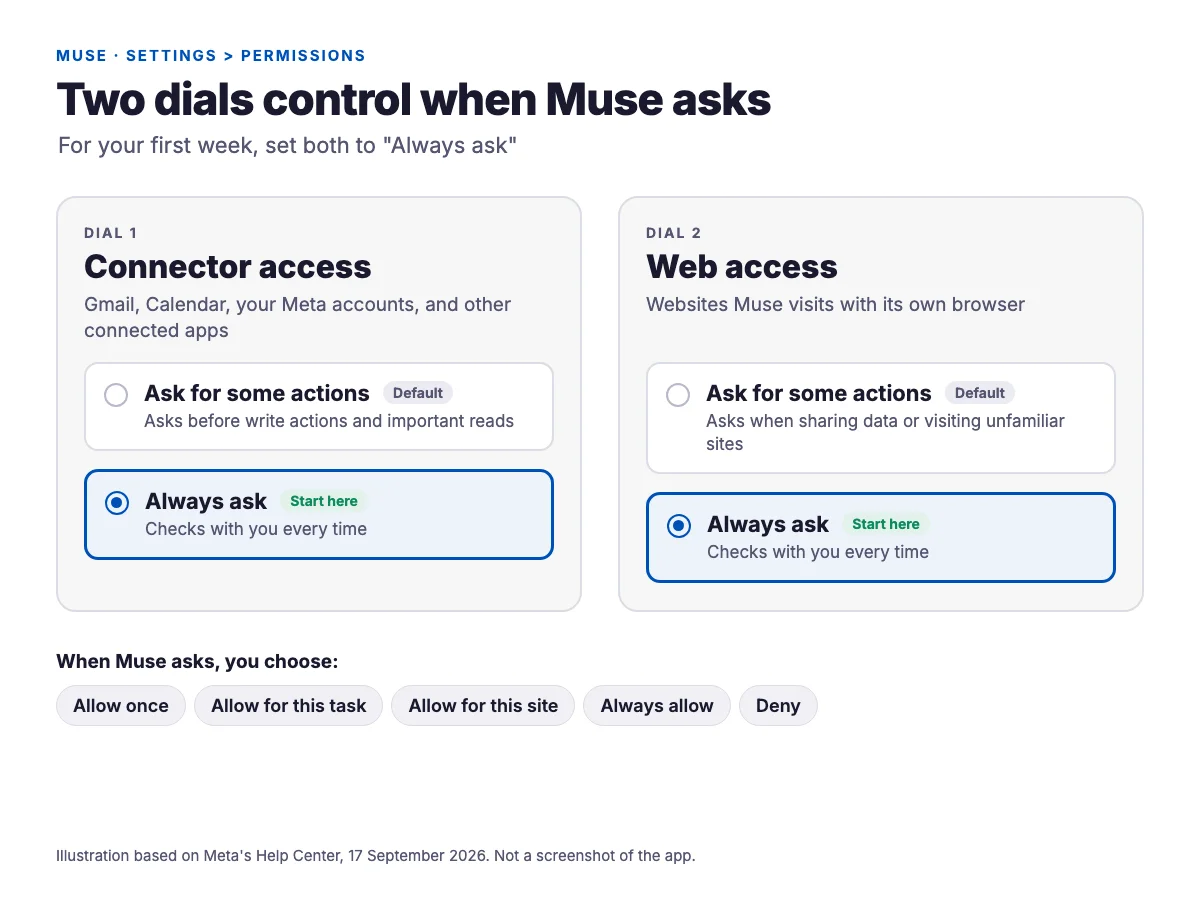
- Set approvals to "Always ask" for your first week. Settings > Permissions has two dials, one for connectors and one for web access. The default, "Ask for some actions", lets Muse do lower-risk things without checking with you. "Always ask" shows you everything it tries. Loosen it once you've seen how it behaves.
- Check Accounts Center before connecting anything. Facebook, Instagram, and Threads connect automatically if they share an Accounts Center with your Muse login. If your business accounts live in the same Accounts Center, assume Muse can reach those too.
- Connect one service. Go to Settings > Connectors, or just type "Connect my Gmail". Add more only when a task needs them. Disconnecting later stops new data flowing, but it doesn't erase what Muse already learned.
- Name it if you like. You can rename your Muse and change its avatar. Optional, and harmless.
- Leave the wallet for later. Add a card only after you've watched Muse finish some read-only work. When you do, early users suggest testing with a tiny purchase first.
- Run one real task, then check the usage meter. Nobody publishes how much a task costs, so your own meter is the only honest guide.
The approval prompt
When Muse wants to do something that needs your permission, you'll see five choices. Picking the right one is most of what keeps an agent safe. Here's how we'd use them:
| Choice | Use it when |
|---|---|
| Allow once | Your default for anything that sends, buys, or shares |
| Allow for this task | A multi-step job where you've already checked the plan |
| Allow for this site | A site you use constantly and trust |
| Always allow | Only read-only actions you've watched it do correctly several times |
| Deny | Anything you didn't expect. Then open the Activity log and find out why it asked |
What it costs
| Plan | Price | Weekly allowance |
|---|---|---|
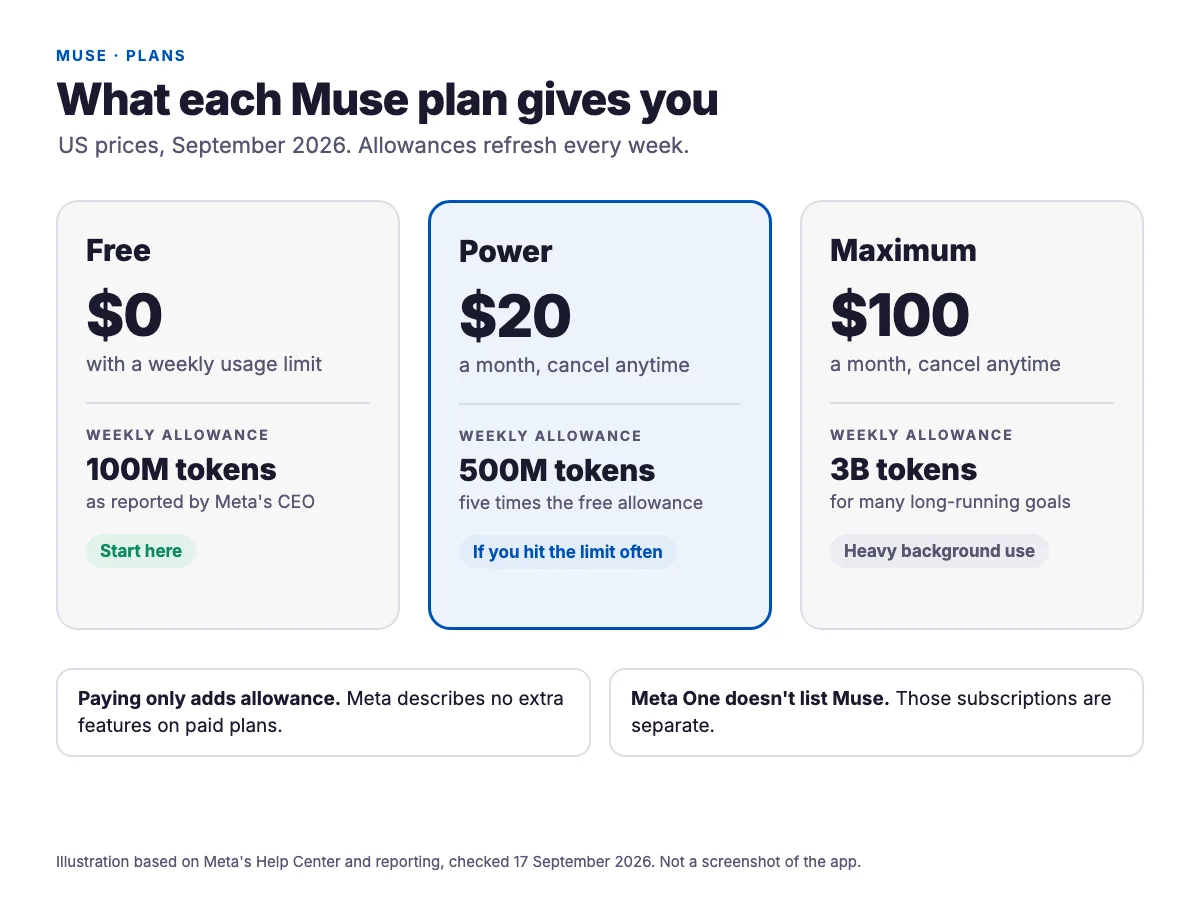
| Free | $0 | Reported as 100 million "Muse tokens" |
| Power | $20 a month | 500 million tokens |
| Maximum | $100 a month | 3 billion tokens |
Meta's Help Center confirms both paid plans, which renew monthly and can be cancelled anytime. The free figure comes from a Threads post by Mark Zuckerberg, reported by Gizmodo and Social Media Today. Nobody publishes what a single task costs, and tasks that click through lots of web pages almost certainly use more than chat does. So start free, run a normal week, and let the meter tell you whether you need more. Paying buys a bigger allowance, and Meta describes nothing else. There's no business plan.
Meta One doesn't include the Muse agent. Meta launched Meta One on 15 September, a week after Muse. Its plans run from $2.99 to $499 a month and add perks like more image and video generation, a verified badge, and publishing tools for creators. Meta's announcement doesn't list the Muse agent in any of them, so don't buy Meta One expecting it.
Path B: Start with Meta AI, wherever you are
The straight answer first: if you're outside the US, the Muse agent isn't available to you, and Meta hasn't said when it will be. There's no country list and no dates. The only hint is a reported two-word reply from Meta's Chief AI Officer, Alexandr Wang, saying Canada is coming "very soon", which we couldn't verify. We couldn't find any explanation from Meta for why the UK, the EU, and everywhere else are excluded.
But you don't have to wait to use Meta's AI. Meta AI, the assistant built into the apps you already have, is available in many countries, and it's where Meta first put Muse Spark and Muse Image in front of everyday users. Here's how to make the most of it today, and how to be ready when the agent arrives.
Step 1: Find Meta AI
Meta AI lives in its own app, on the meta.ai website, and inside WhatsApp, Instagram, Facebook, and Messenger. The Meta AI iPhone app is listed in the App Store in the UK, Canada, Australia, Mexico, Brazil, India, the Philippines, and Germany, among others. You need to be 13 or older, or older where local law requires. Meta is candid that the apps are "not yet available everywhere" and that some features may not be available in your area, so what you see can differ from what's described here.
- In the Meta AI app: tap "Ask Meta AI…", choose a mode by tapping the current mode in the bottom right, type your question, and send.
- In Facebook: tap the Messenger icon, then the Meta AI button in the upper right. This works in the phone apps, not on a computer.
- In a group chat: mention @Meta AI. Be aware that a message mentioning Meta AI inside an end-to-end encrypted chat isn't end-to-end encrypted itself.
Step 2: Check which modes you have
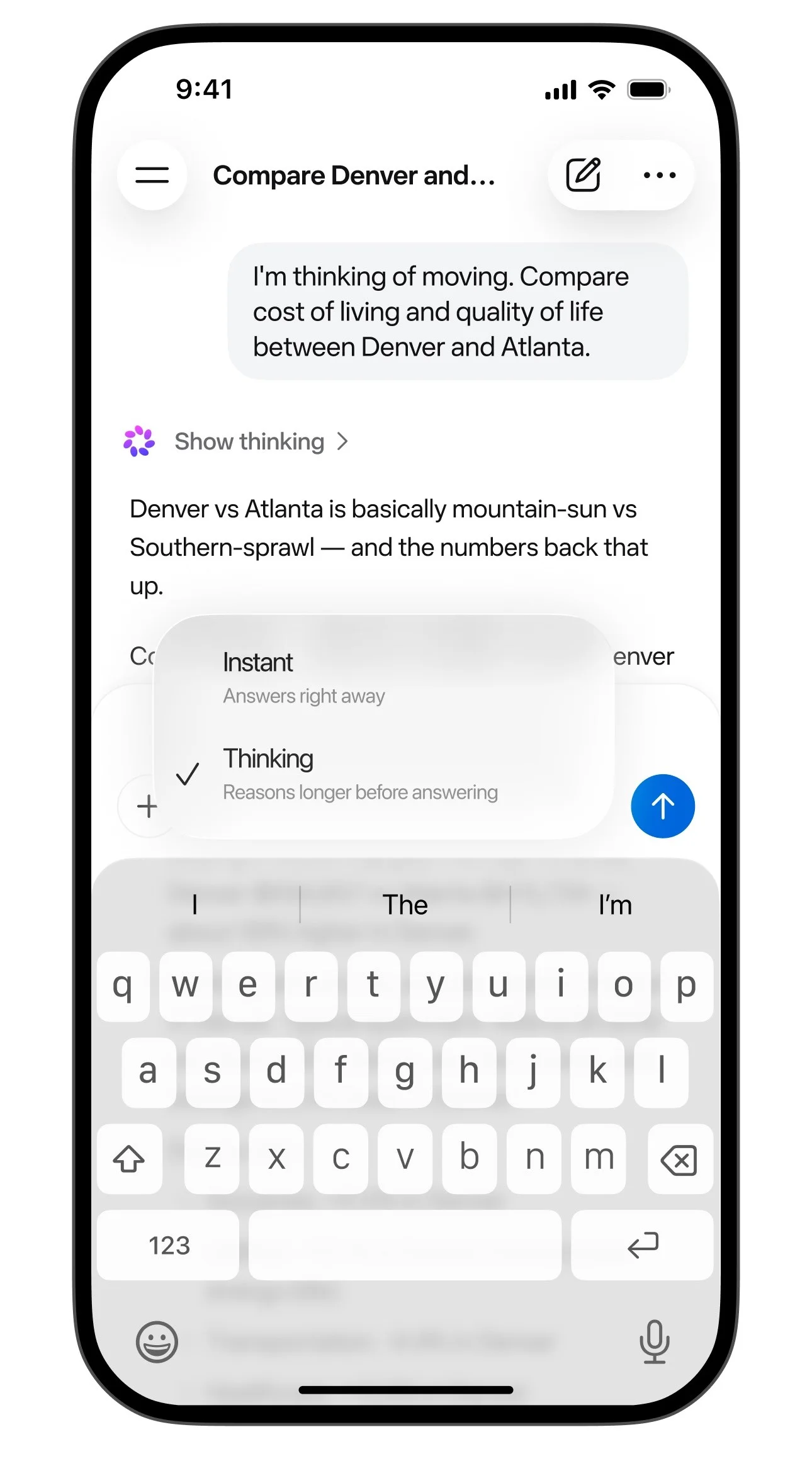
Meta hasn't published which countries have the newer, Muse Spark-powered Meta AI. In July it described new features as live in "select markets", with more countries "in the coming weeks". The simplest check is your own app. Meta's current Help Center describes three modes: Instant for quick answers, Thinking for harder reasoning, and Shopping as a shopping concierge. What your mode picker offers tells you what you can use right now.
Step 3: Try the things it's good at
- Ask about a photo. Tap the plus icon, take a picture or pick one from your library, and ask your question. A product label, a competitor's menu, or a chart from a report all work well as starting points.
- Use Thinking mode for harder questions. Pricing decisions, plans, and anything where you want reasoning rather than a quick answer.
- Create an image. Start your request with "imagine" or "create an image". To turn an image into a short video, tap it, then tap Animate.
- Talk to it. Voice chat lets you interrupt and change topics, and the app listing says voice mode works in 13 languages.
(Thinking mode) I run a small bakery. Compare three ways to price a weekly bread subscription, and tell me the main risk of each.
(With a photo of a competitor's menu) What are they charging more for than a typical cafe? Suggest two specials I could add this month.
Imagine a bright, clean flyer for a Saturday coffee and pastry special, with the words "Weekend Special" large and easy to read.
Step 4: Set your privacy basics
Meta AI is free, and part of the reason is ads. Since 16 December 2025, Meta has used people's conversations with its AI to personalise the content and ads they see, leaving out sensitive topics such as health, religion, and politics. Meta's announcement names no way to opt out, though press reports say users in the EU, the UK, and South Korea are excluded. Three settings are worth knowing:
- Incognito chat. In the Meta AI app, tap Menu, then Incognito chat, and type in "Ask Meta AI privately…". Meta says it can't access these chats and doesn't save them. It launched in May for WhatsApp and the Meta AI app and is rolling out gradually, so use it for anything personal.
- Delete your history. Menu > Settings > Data & privacy > Manage your information > Delete all chats and media.
- Objecting to AI training in the EU and UK. Meta offers an objection form for using your public posts, and in the EU your Meta AI chats, to train its AI.
Step 5: Decide whether to pay
Meta AI stays free for everyday use. Meta One's Core and Premium plans, $7.99 and $19.99 a month in the US, mainly raise how many images and videos you can create. Meta hasn't published the limits for any tier, and prices vary by country: Indian press reports put Core at Rs 549 a month, for example. Unless you regularly hit the image limit, there's no reason to pay.
Step 6: Get ready for the agent
- Tidy your Accounts Center. When the agent arrives, your Facebook, Instagram, and Threads accounts will connect to it automatically if they share an Accounts Center with your login. Decide now which accounts belong together.
- Keep saving good ideas on Instagram. The agent can read your Instagram saves, so a well-organised collection becomes material it can work with later.
- Write your first three goals. Use the examples in Section 09. The habit of stating the outcome, timing, and limits makes any AI tool more useful, including the ones you have now.
- Watch Meta Connect on 23 and 24 September. The agenda includes sessions on Muse Spark, though nothing on country expansion.
- Don't use a VPN. Meta's Help Center requires Muse subscribers to be located where Muse is available, and you'd be handing an agent your real accounts from a location Meta doesn't support.
If you need an agent today
Google's Gemini Spark is the closest equivalent you can use outside the US: a similar round-the-clock agent on its own cloud computer, for Google AI Pro and Ultra subscribers in more than 160 countries. It isn't available in the European Economic Area, the UK, Switzerland, or Nigeria. ChatGPT's and Claude's agent tools are broadly available, mostly on paid plans. Section 06 compares them.
Muse vs other AI agents
An agent is an AI that takes actions for you instead of only answering questions. The product most like Muse is Google's Gemini Spark, which launched in May and works the same way: a round-the-clock agent on its own cloud computer that browses websites for you. Here's the field as of mid-September.
| Agent | Acts for you? | Price (US) | Where |
|---|---|---|---|
| Meta Muse | Yes, on its own cloud computer | Free; $20; $100 | US only |
| Google Gemini Spark | Yes, on its own cloud computer | Needs Google AI Pro ($19.99) or Ultra ($99.99 or $199.99) | 160+ countries, not the EEA or UK |
| ChatGPT | Yes, through ChatGPT Work, a Chrome extension, and a cloud browser, with limited use on the free tier | Free and Go ($8) with ads; Plus $20; Pro $100 or $200 (as reported) | Broadly global |
| Claude | Yes on paid plans, in Chrome and Cowork | Pro $20; Max from $100 | Broadly global |
| Microsoft Copilot | Narrowly: browsing in Edge on desktop | Microsoft 365 Premium | US only |
| Amazon Alexa+ | Yes: reservations, delivery, shopping | Free with Prime; $19.99 otherwise | US, Canada, early access in 8 more |
| Apple Siri AI | Actions inside Apple's own apps (beta) | Free with a supported device | English first, not the EU at launch |
Where Muse has the edge
- Price of entry. Unlike Gemini Spark, Claude's agent tools, and Microsoft's browsing agent, which all need a paid plan, Muse has a free tier.
- Where it lives. It works inside WhatsApp and can draw on your Instagram, Facebook, and Threads accounts, which counts for a lot if your life or business already runs through Meta's apps.
- Payments built for agents. Single-use card numbers through Link by Stripe, with your approval on every checkout that uses saved details.
- Transparency about safety. Meta has published a detailed account of how its agent is secured.
Where it doesn't
- Availability. One country, against Gemini Spark's 160-plus and the broad reach of ChatGPT and Claude.
- Raw model strength. Artificial Analysis's index puts Meta's best model just behind the top models from Anthropic and OpenAI.
- Track record. Meta's history with privacy is part of the decision, and we cover it in Section 11.
Real head-to-head testing barely exists yet. The only published comparison we found is one experienced reviewer's few hours with Muse and rival agents, which is useful but not a benchmark.
Which agent to choose
- You're in the US and want to try an agent without paying: Muse.
- You're outside the US and Europe, and pay for Google AI Pro or Ultra: Gemini Spark.
- Your work needs the strongest writing, analysis, and research: ChatGPT's or Claude's agent tools, backed by the models that top Artificial Analysis's index.
- You already pay for Prime: Alexa+ costs nothing extra to try.
Meta AI vs ChatGPT, Gemini, and Claude
You don't need the Muse agent to use Meta's AI. Meta AI, the assistant inside WhatsApp, Instagram, Facebook, Messenger, and the Meta AI app, works in far more countries, and Meta is moving it onto Muse Spark market by market. So how does it compare with the chatbots most users already know? Here's the picture in mid-September.
| Meta AI | ChatGPT | Gemini | Claude | |
|---|---|---|---|---|
| Free version | Free for everyday use. Limits not published | Unlimited text chats, with ads | Free, on Gemini 3.6 Flash | Free, on Claude Sonnet 5 |
| Cheapest paid plan | Meta One Core, $7.99 | Go, $8 (still has ads). Plus, $20 | Google AI Plus, $4.99 | Pro, $20 |
| Makes images | Yes, with Muse Image | Yes, limited on free | Yes, with Nano Banana | No |
| Voice chat | Yes | Yes | Yes | Yes |
| Where it lives | Inside Meta's apps and glasses | Web, phone, desktop, and a Chrome extension | Android, iPhone, web, Mac, Windows. Gmail on paid plans | Web, phone, desktop. Chrome and Office on paid plans |
| Your chats and ads | Used to personalise ads, with no opt-out named | Ads on the Free and Go plans | Google says chats aren't used for ads | No ads |
US prices, checked on 17 September. OpenAI's own pricing pages couldn't be read that day, so the ChatGPT figures come from recent reporting. Google and Meta prices vary by country.
How good is the brain behind it?
Two independent scoreboards are worth knowing. Artificial Analysis runs capability tests, and its 7 September index announcement put Meta's best model, Muse Spark 1.3, fifth: behind three Claude models and OpenAI's GPT-6 Astra, and comfortably ahead of Google's best Gemini score. Arena measures which answers people prefer in blind side-by-side chats. On 13 September, Meta's best entry ranked fourth, Google's best ninth, and OpenAI's best eighteenth, with Anthropic's Claude Fable 5 in first. The top scores are close enough that a few places either way don't mean much.
One caveat matters more than the rankings. Those scores are for Meta's strongest model settings, which aren't necessarily what you get in the free app. The most recent version Meta has named inside Meta AI is Spark 1.1, from July. Spark 1.3 is so far only in Meta's developer tools.
Where Meta AI has the edge
- It's already where you are. No new app to learn. It's inside WhatsApp, Instagram, Facebook, and Messenger.
- Free images, built in. Muse Image comes with the free version. Claude can't make images at all.
- It's good at looking at things. When Spark launched, Artificial Analysis found it second-best on a major vision test. Meta also says it built its health answers with training data curated by more than 1,000 physicians.
- Shopping close to home. Meta AI's shopping help searches Facebook Marketplace listings alongside the wider web.
Where the others win
- Privacy around ads. Since December 2025, Meta has used what people say to its AI to personalise the ads and content they see, excluding sensitive topics like health and religion, and its announcement names no way to opt out. Google says Gemini chats aren't used for ads, and Claude has no ads at all.
- Writing and heavier work. In Zapier's roundup, last updated in November 2025 and so before the newest models, ChatGPT was the best all-rounder and Claude the best for writing and coding. Meta AI's standout was social media images and video.
- Knowing what you're getting. Meta hasn't said which Spark version runs in the Meta AI app, or published usage limits for any tier, so it's hard to know exactly what you're using.
- Your work tools. Gemini works inside Gmail from its $4.99 plan, and Google's plan page adds Docs from AI Pro at $19.99. Claude works inside Excel, Word, and PowerPoint on paid plans.
Which one for everyday use?
- You live in WhatsApp and Instagram and want quick answers and free images: Meta AI. Keep sensitive topics out of it.
- You want one strong all-rounder: ChatGPT, bearing in mind that the Free and Go plans show ads.
- You write a lot, or privacy matters most: Claude, which has no ads and trains on your chats only if you allow it.
- Your business runs on Google Workspace: Gemini, which works in Gmail from $4.99 a month and in Docs from $19.99.
Plenty of users end up with two: Meta AI for quick things inside the apps they already have open, and one of the others for real work. That's a perfectly sensible setup.
Muse Image vs ChatGPT, Nano Banana, and Midjourney
If you make social posts, promo graphics, or product shots, Muse Image is probably already sitting in an app you use. Here's how it compares with the three image tools creators talk about most, as of mid-September.
| Tool | Free? | Cheapest paid | Arena rank |
|---|---|---|---|
| Muse Image Meta AI app, meta.ai, WhatsApp in some countries, and Stories effects in the US | Yes, no published limit | Meta One Core, $7.99, for more images | No. 7 creating, No. 6 editing |
| ChatGPT Images 2.5 In ChatGPT | Yes, with limits | Go, $8, or Plus, $20 (as reported) | No. 1 and No. 2 for both |
| Nano Banana 2 Google's Gemini app | Yes | Google AI Plus, $4.99, which adds Nano Banana Pro | No. 9 creating, No. 12 editing |
| Midjourney V8.2 Midjourney website and Discord | No free option | Basic, $10 a month | Not listed |
Arena ranks as of 7 September. Google's paid Nano Banana Pro ranks No. 14 for creating and No. 9 for editing.
What the rankings tell you
Arena ranks images by blind public votes, and Artificial Analysis runs its own head-to-head comparisons. Both put OpenAI's ChatGPT Images 2.5, released on 8 September, first and second for creating and editing images. Muse Image is seventh for creating on both boards, with Google's Nano Banana 2 two places below it on Arena and one place above it on Artificial Analysis. For editing, Muse Image is sixth on both, slightly ahead of the Nano Banana models. Scores that close are near enough to a tie that your own test matters more than the rank.
Two things to watch for. Articles still calling Muse Image "No. 2 in the world" are quoting its launch week in July. And Midjourney's current version isn't on either board (Artificial Analysis lists only older versions), which isn't a verdict on quality. It may simply be because Midjourney has no public way for testers to plug in.
Where each one wins
No new app and no subscription. It works in Meta AI and WhatsApp where available, and it holds its own for editing existing photos. Meta says it handles clean text inside images, though we found no independent test of that yet.
First and second on every board we checked. Free users get Images 2.5 too, with lower limits, though OpenAI hasn't said which of its two versions they get. The strongest all-round choice right now.
It won the realism and dense shop-sign lettering rounds in Decrypt's September test against ChatGPT Images 2.5, which won the illustration and layout rounds. The overall score was a 3 to 3 tie.
Reviewers still pick it for artistic direction and photographic mood. It struggles with more than a few words of text, and it has no free option.

Ownership, watermarks, and the fine print
| Tool | Who owns the image | Watermarks |
|---|---|---|
| Muse Image | Meta's AI terms say you keep rights in your prompts and say nothing about the images. You also need consent from anyone shown in photos you upload | An invisible mark Meta calls Content Seal. In a Reuters test, Meta's checker missed 55% of heavily cropped images |
| ChatGPT Images | OpenAI's terms reportedly assign the output to you. We couldn't read OpenAI's terms page directly | Invisible provenance data on every image, and no visible watermark by default |
| Nano Banana | Google's terms say it "won't claim ownership" of what you generate | Invisible SynthID and provenance data always stay on. Since mid-August you can switch off the visible sparkle in Settings > Media Watermark (in India, South Korea, and Vietnam, only on AI Ultra) |
| Midjourney | You own what you create, but companies earning over $1 million a year must be on Pro ($60) or Mega ($120) to own their images | Your images are public by default. Only Pro and Mega can hide them with Stealth mode |
Which one for which job
- Quick posts, free: Muse Image, right in Meta AI. Its Instagram Stories effects are US only.
- Text-heavy graphics like posters and promo cards: ChatGPT Images 2.5 or Nano Banana 2. Reviewers split on which handles lettering better, so try your actual design in both.
- Editing a product photo: ChatGPT Images 2.5 leads, with Muse Image and Nano Banana close behind.
- A distinctive artistic look: Midjourney, if you're happy to pay and your images being public on the cheaper plans doesn't matter.
- Anything you need to clearly own, like a logo or packaging: not Muse Image, whose terms say nothing about ownership. Midjourney's terms say you own what you create (on Pro or Mega if your company earns over $1 million a year), and Google's say it won't claim ownership.
What to hand Muse first
Muse suits different people for different reasons. Pick your path, and start with the jobs on the left of each list.
The admin nobody enjoys
Clearing your inbox, sorting saved content, watching prices, and planning trips and events are Muse's best work. Keep approvals on for purchases, and wait for the encrypted version before connecting health or bank accounts.
Get my inbox under control by Friday. Every morning at 7, archive promotional email older than three days, list anything from a real person that needs a reply, and flag bills with their due dates. Don't delete anything, and don't reply to anyone without asking me.
Research, organisation, and raw material
Muse reads your Instagram saves, does the digging, and hands you files. It won't post for you: Meta hasn't documented whether its Instagram connector can publish or read your insights, so don't build a workflow around that yet.
Go through the posts I've saved on Instagram and group them into content ideas by theme. For each theme, write three post angles and one hook. Put it all in a PDF I can print. Don't post, comment, or message anyone.
Your admin, not your customers
Muse is a personal agent, not a customer service bot. Use it for inbox triage, supplier follow-ups, travel, scheduling, and a weekly briefing. For answering customers in WhatsApp, Messenger, and Instagram, Meta has a separate product called Meta Business Agent, which has cost $2 per million tokens since 1 August, about 4 to 5 US cents a message.
Every Monday at 8, make a one-page PDF from last week's supplier emails: what was ordered, what's late, and what needs a decision from me. Ask before contacting anyone.
Two more business facts worth having. From 1 October, WhatsApp starts charging businesses for customer service messages, which have been free since November 2024. And don't plan around AI-made ads from Muse yet: Meta announced Muse Image for Advantage+ creative in July for "the coming weeks", we found no confirmation it's live, and its reported goal of fully automated ad creation hasn't shipped. Check your own Ads Manager instead of trusting a headline.
Getting more out of it
We couldn't find a getting-started guide or any example prompts from Meta. These habits come from Meta's documentation, the independent tests, and the ways AI agents tend to go wrong.
Give it goals, not chores
A good goal answers four questions. What does done look like? When? What must it never do without asking? Where should the result go? Meta says its current model asks clarifying questions when something's unclear, so answer them rather than starting over. Look back at the example goals in Section 09: each one covers all four.
Earn trust in the right order
Start with jobs that only read and organise. Move on to jobs that draft things for you to send. Only then let it send, book, or buy, and keep approvals on when you do. That's the order in which the tests say it's reliable, and it means your first mistakes happen where they're cheap.
Check the work, not the summary
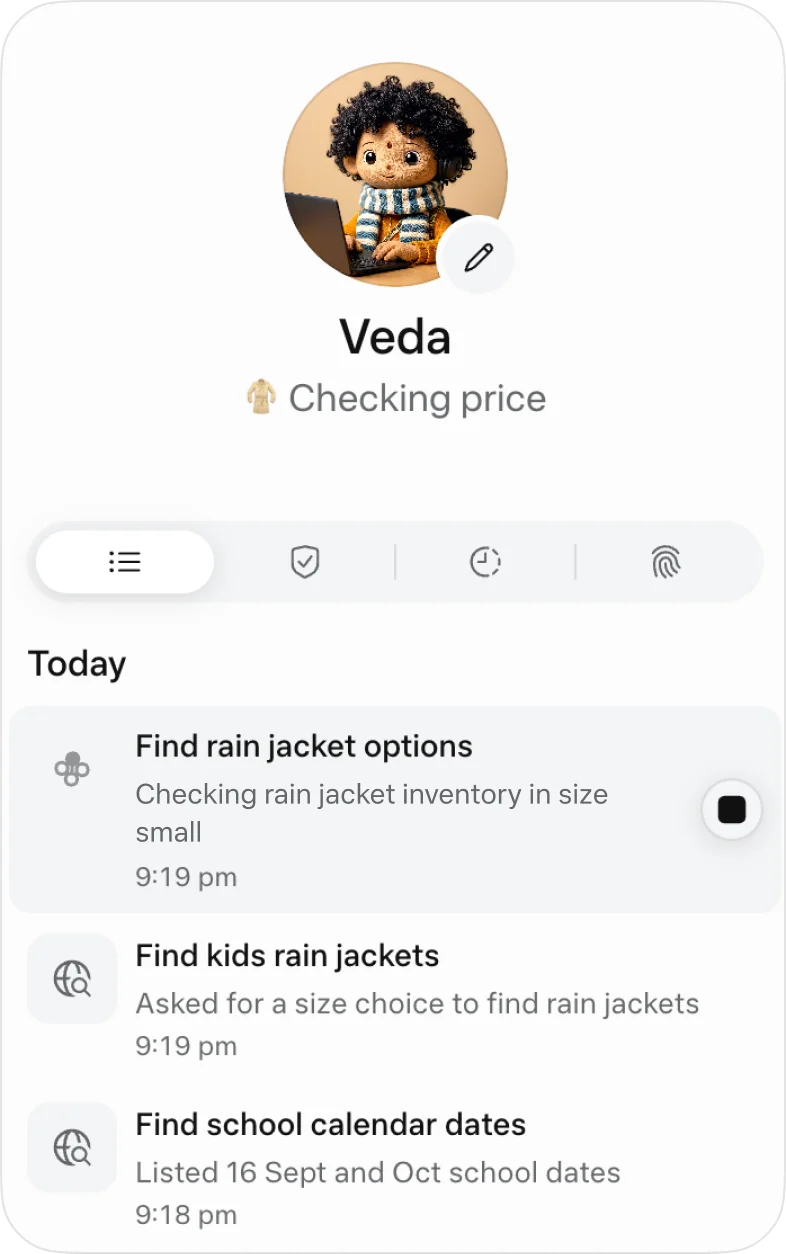
A chat message saying "done" isn't evidence. Open the Activity log once a week to see what Muse actually did. Confirm a price on the merchant's own site before approving a purchase. Check that a background monitor is still running, since, according to Reuters, Meta's own testers saw one stop silently. And don't fire off dozens of jobs at once: one stress test saw almost three in four sub-tasks fail to start when 120 were launched together, while a spaced-out run of 80 had no failures.
Curate what it remembers
Muse keeps its memory in a file called MEMORY.md. Read it. Correct anything wrong, and tell Muse to forget things it shouldn't hold onto, like a client's name or a health issue. It takes five minutes, and it's your best defence against an assistant that confidently remembers the wrong thing.
Ask for files you'll reuse
Muse makes PDFs, Word documents, spreadsheets, and small interactive tools, and saves them in your Library. A recurring briefing that arrives as a PDF is one of the most useful things it does, and it's easy to forward to a partner or an assistant.
Watch for hidden instructions
Web pages and emails can contain text written to trick AI agents into doing something you never asked for. Meta has several layers of defence and still says Muse "isn't immune to attack." Keep approvals on for anything that sends your data somewhere, and be most careful with goals that read email from strangers and then act on it.
Use WhatsApp for quick requests
Messaging Muse in WhatsApp is handy when you're already in the app. One tester found that version bare-bones compared with the Muse app, which is where Goals, Ideas, the Activity log, and your files live. Do your setup and your real work in the app.
Pay only when the meter tells you to
Stay on the free plan until you hit the weekly limit more than once. Power, at $20, gives you five times the reported free allowance, which is plenty for most people. Maximum is for running lots of long background goals at the same time.
The one habit worth building this week. Set a single goal: every morning, sort your inbox and send you a short list of emails from real people that need a reply, with permissions on "Always ask". Check the Activity log on day three. If it got it right, you've found the job Muse does best. If it didn't, you've learned that for free.
Good to know before you go all in
Muse is worth trying, and it's worth trying with your eyes open. Here are the limits that matter, each with what to do about it.
| The limit | What to do about it |
|---|---|
| US only, with no dates for anywhere else | Follow Path B in Section 05. Don't use a VPN: Meta's Help Center requires subscribers to be located where Muse is available, and you'd be handing an agent your real accounts from a location Meta doesn't support |
| Not end-to-end encrypted yet. Meta says its policies restrict staff access, but that this "does not prevent Meta from accessing data when necessary" | Connect as little as a task needs. Keep client-confidential, health, and main bank accounts out until the promised "Confidential VM", encrypted with a key only you hold, ships "later this year" |
| Training on your chats is on by default | Switch off "Help improve our AI models" in Settings > Data controls |
| Its browsing counts as your activity. Meta says your chats aren't shared with its ad systems, but a store Muse visits for you can show you ads later | Expect it, and don't let Muse browse anything you'd rather Meta's ad systems didn't associate with you |
| Shaky at finishing purchases | Use "Allow once", confirm prices on the store's own site, and check the order confirmation |
| Early reliability. Reuters reported that during Meta's internal testing the agent got around its guardrails and exposed personal photos, and a monitoring task stopped silently | Keep approvals on, read the Activity log weekly, and check that background tasks are still running |
| Unclear costs per task | Run a normal week on the free plan and read the usage meter before paying |
| Image ownership isn't granted. Meta's AI terms say nothing about who owns what Muse Image makes | Use it for posts and promos, not logos or brand assets you need to own |
| Muse Video isn't generally available | Ignore look-alike "Muse Video" websites. None of them are Meta |
There's also Meta's track record, which frames most coverage of Muse: FTC settlements in 2011 and 2019, the second with a $5 billion penalty, and an $18 billion settlement with US states over harm to young users, agreed 13 days before Muse launched. You don't have to treat that as a dealbreaker. But it's a good reason to use the controls above rather than trusting the defaults.
Who should wait. If you'd be connecting accounts that hold client-confidential information, health records, or your main bank, hold off until the Confidential VM ships and someone independent has examined it. Muse will still be here in three months, and the version Meta says even it can't read is the one worth trusting with that data.
Your next step
You don't need to overhaul how you work to find out whether Muse belongs in your week. You need one small, well-chosen test.
Twenty minutes with the agent
Install "Muse from Meta", switch off training in Settings > Data controls if you'd rather, set approvals to "Always ask", and connect your email. Then give it one goal: every morning, tell you which emails from real people need a reply. Check the Activity log in three days. If it gets that right, give it a bigger job.
Twenty minutes with Meta AI
Open the Meta AI app or find Meta AI in WhatsApp. Ask one real business question (in Thinking mode, if you have it), ask about one photo, and create one image for your next post. Use Incognito chat for anything personal, if your app has it. Then write down the three goals you'd hand the agent on day one, so you're ready when it reaches you.
Muse is early, and it will change quickly. Meta Connect on 23 and 24 September is the next moment that could change what's available and where. Whichever path you're on, the users who get the most from AI agents are the ones who start small, check the work, and give the tool more responsibility only when it's earned it. You can start that today.