What AI image makers can do for your business
If you run a business or create content, you need images all the time. Product photos for your store. Graphics for this week's posts. A thumbnail for your next video. A flyer for Saturday's event. Until recently, every one of those meant hiring someone, paying for stock photos, or losing an afternoon to a design app.
Now you can describe what you want in a sentence and get a finished image back in seconds. Upload a photo of your candle and have it placed on a marble counter in soft morning light. Hand over a rough doodle of a poster and get back a polished design. Ask for a set of thumbnail ideas featuring your face, and they'll still look like you.
And the two best tools for this are probably already on your phone. One lives inside ChatGPT. The other lives inside Google Gemini.
This guide walks you through both: what each one is great at, where each one still stumbles, what it costs, and which one to reach for depending on the job in front of you. You don't need any technical background. If you do want the technical details, they're collected in a reference section near the end.
Meet the two contenders
Inside ChatGPT: GPT Image 2.5
OpenAI's newest image model, released September 8, 2026. Think of it as the careful finisher: slower and pricier, but excellent at polish and at protecting details you've already approved.
Inside Gemini: Nano Banana 2
Google's image model, released February 26, 2026. Yes, that's really its name. Think of it as the fast workhorse: quick, cheap, and able to check the live web while it works.
The only names you need for now: when you make images in ChatGPT, you're using GPT Image 2.5. When you make images in Gemini, you're using Nano Banana 2 by default. You'll see other names in headlines, like "ChatGPT Images 2.5," "Gemini 3.1 Flash Image," and "Nano Banana Pro." There's a cheat sheet for all of them in Section 11.
What they can actually do
Create from a sentence
Describe a scene in plain English and get a finished image. No design skills needed.
Edit your own photos
Swap a background, change a color, or adjust the lighting on a photo you already have.
Put your product in a scene
Upload a product photo and have it placed in a lifestyle setting while keeping its look intact.
Keep a face consistent
Use your own photo to build a whole series of thumbnails or posts that still look like you.
Add readable text
Headlines, prices, and labels that come out spelled correctly far more often than older AI tools managed.
Go from rough idea to design
Sketch a layout in ChatGPT or paste your notes into Gemini, and get back a finished visual.
Both tools can do all six to some degree. The difference is how well, how fast, and at what price. That's what the rest of this guide is about.
The quick answer: which one should you use?
Here's the honest truth first. Both are excellent, and they're much closer in quality than the headlines suggest. When a reviewer at Decrypt gave both models the same six challenges, the final score was a 3 to 3 tie.
So the real difference isn't which one makes prettier pictures. It's speed, price, and the specific kinds of mistakes each one tends to make.
Start with Gemini if...
You're new to this or on a budget. You need lots of options fast. Your image needs real facts like dates, places, or current events. Your text is in another language. Or you need an extra-wide banner.
Reach for ChatGPT if...
The image needs to look like you or your actual product. You need a transparent background for a logo or sticker. You're making an English poster where every word must be spelled right. Or you're polishing one important image over many rounds of edits.
Most people who make images for a living end up using both. They brainstorm in Gemini because it's fast and cheap, then move the winning idea into ChatGPT for the final polish. You'll find that workflow, step by step, in Section 09.
On a zero budget? Start with Gemini. Its free plan gives you roughly 20 images a day. ChatGPT's free plan gives you about 2 or 3. When you're learning a new tool, that difference matters far more than any quality gap.
Getting started: where to find them and what they cost
Making images in ChatGPT
Open ChatGPT on your phone or computer and just ask: "Create an image of..." That's it. You can also upload a photo and describe the changes you want.
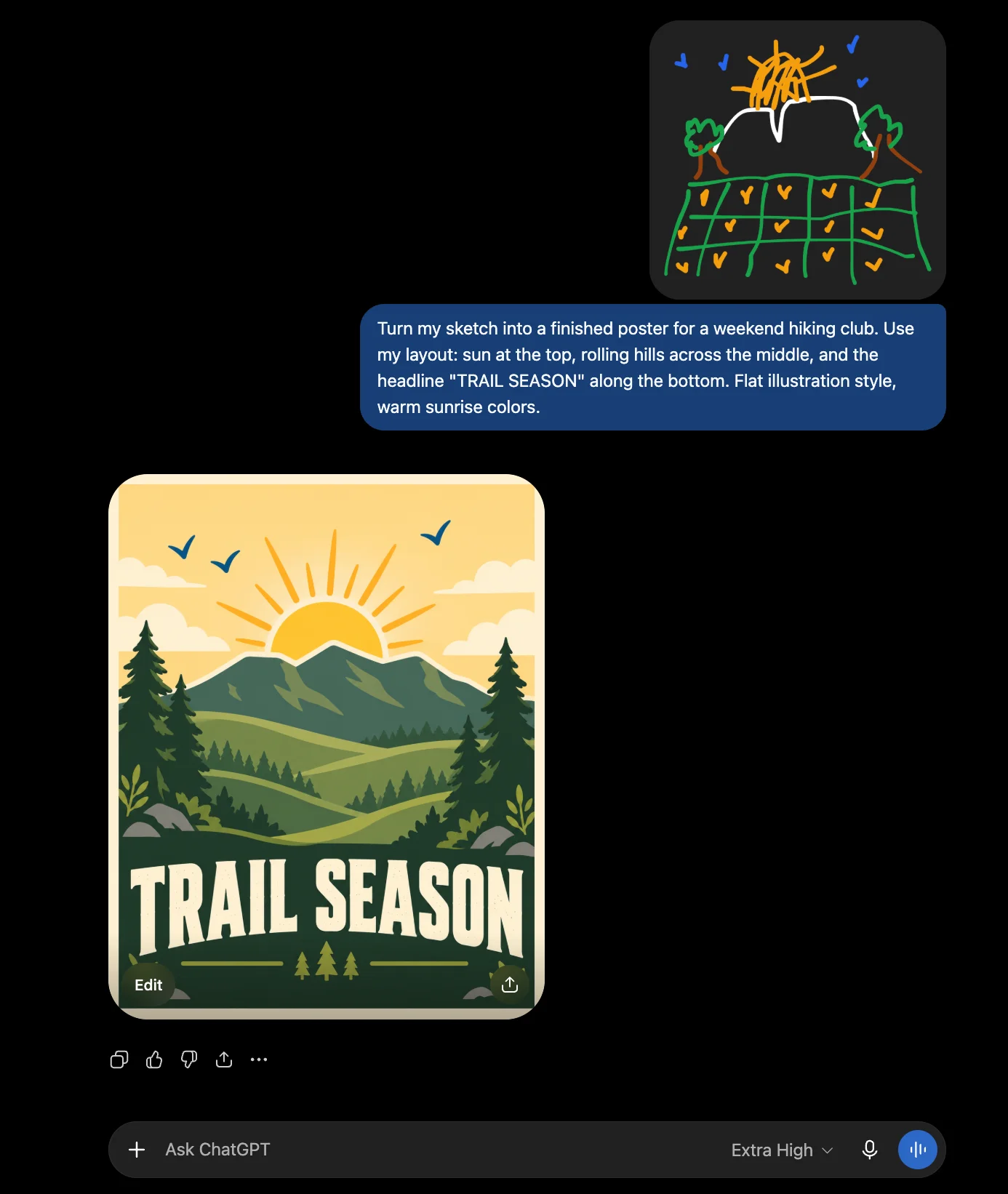
For more control, type @Sketch or find Sketch in the + menu. It opens a drawing tool where you can rough out a layout with your finger or mouse, start from templates for posters, merch, flyers, and product photos, and leave comments directly on an image to fix one specific spot. If you think in pictures more than words, this is the easiest way to get what's in your head onto the screen.
Making images in Gemini
Open the Gemini app or website and ask it to create an image. It works the same way: describe what you want, or upload a photo to edit. You can ask for a specific shape right in your request, anything from a square to a very wide banner.
Google's image models also show up inside tools you may already use, including Google Slides, Google Vids, Google Ads, and Google Search.
What each plan gets you
| Plan | Price per month | Images you get |
|---|---|---|
| ChatGPT Free | $0 | About 2 to 3 per day |
| ChatGPT Go | $8, with ads | More than Free, no published number |
| ChatGPT Plus | $20 | About 40 to 50 every 3 hours |
| ChatGPT Pro | $100 or $200 | Far higher. OpenAI has described Pro image creation as unlimited, within its abuse limits |
| Gemini Free | $0 | About 20 Nano Banana 2 images plus about 2 Nano Banana Pro images per day |
| Google AI Plus | $4.99 | About 50 per day |
| Google AI Pro | $19.99 | About 100 per day |
| Google AI Ultra | $100 or $200 | The highest limits, reported at up to 1,000 per day |
A few honest caveats. Both companies change these limits often and don't always publish exact numbers, so treat the image counts as ballpark figures and trust the banner inside the app for your own account. Prices are US prices as of September 2026. Google cut AI Plus from $7.99 to $4.99 in June 2026. Most sources still list ChatGPT Plus at $20, but at least one reports a rise to $24, so check before you subscribe.
About that watermark: images from Gemini's free plan carry a small visible Gemini logo. Third-party guides report it only goes away on Google's top Ultra plan or through its paid developer access. If you're making images for clients or your storefront, factor that in before you build your workflow on the free plan.
GPT Image 2.5 in ChatGPT: the careful finisher
GPT Image 2.5 is the newer of the two, about six months younger than Google's model. On independent blind-vote rankings, where users pick the better of two images without knowing which tool made them, it currently sits at number one for both creating and editing images.
Its personality is careful. It takes its time, usually 25 to 40 seconds per image, and it's very good at protecting what you've already approved.
Where it shines
| Best use | Why it works | Try it for |
|---|---|---|
| Keeping your face consistent | Its biggest improvement. Photos of real people come back still looking like that person, across poses and styles. | Weekly YouTube thumbnails, personal brand posts, headshot variations |
| Long back-and-forth editing | Earlier edits survive later ones instead of quietly resetting. | Refining one hero image over many rounds |
| Logos, stickers, and merch | The only one of the three with documented transparent backgrounds, saved as PNG or WebP files. | T-shirt designs, sticker packs, logo concepts |
| Posters and labels in English | The best spelling accuracy in testing, around 99% for English text. | Event flyers, sale signs, product labels |
| Illustration and moody scenes | Won the illustration, composition, and abstract-idea rounds in a six-round head-to-head, with standout lighting and atmosphere. | Blog headers, book covers, story art |
| Product photos from your real item | Better at preserving the products in your reference photos. Its premium developer version, Sunburst, stayed closest to the original product's shape in testing. | Store listings, ad creative |
| Rough sketch to finished design | The Sketch tool, with templates for posters, merch, flyers, and product photos. | Layouts that are easier to draw than to describe |
What sets it apart
It remembers your face. Upload a photo of yourself, ask for a set of thumbnail concepts, and they still look like you. Reviewers testing YouTube thumbnail variations found the likeness held across different poses and styles. If you put your face on your content every week, this alone is a good reason to pick ChatGPT.
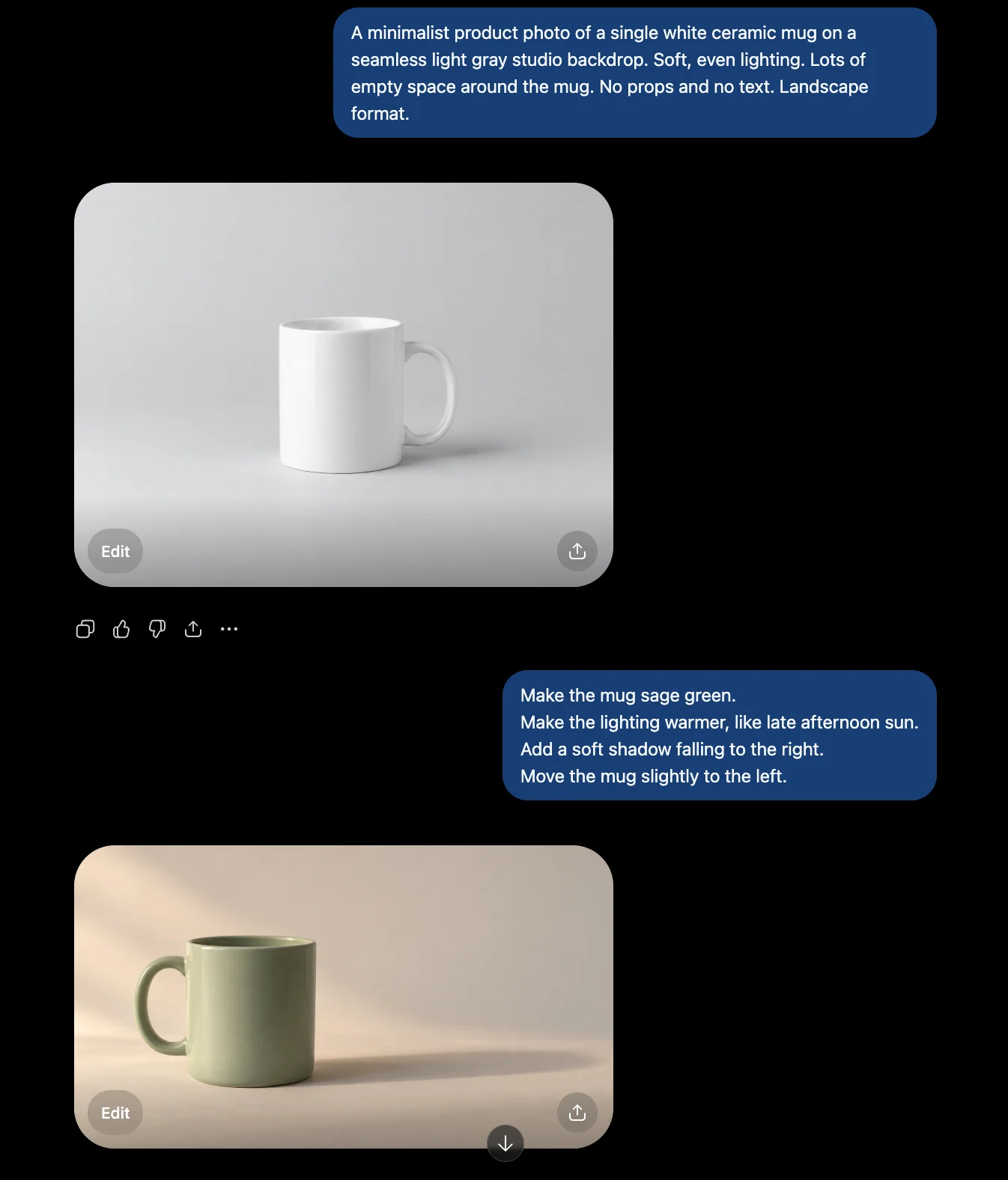
Your edits stick. Older AI tools had an infuriating habit: fix one thing and something else quietly changes. GPT Image 2.5 mostly solves this. Change a mug's color, then adjust the lighting, and the new color survives. As one reviewer put it, a picture you approved on turn two still looks approved on turn nine.
Where it still fails
| Still failing | What goes wrong | What to do instead |
|---|---|---|
| Clean skies, walls, and backdrops | Grain, checkerboard patterns, and busy repeating textures can appear on flat surfaces. This is the most common complaint. | Zoom to 100% before approving. Regenerate, or make clean backgrounds in Gemini. |
| Wide banners and tall strips | It can't go wider than 3:1 or taller than 1:3, and there's no workaround. | Use Nano Banana 2, which goes up to 8:1. |
| Infographics with real facts | It can't check the web. In testing, it put a well-known event in the wrong year. | Use Nano Banana 2, or supply every fact yourself and proofread. |
| Flowcharts with many branches | Yes and no paths get swapped, and some loops make no sense. | Build diagrams in a diagram tool. Use AI for decoration only. |
| Celebrities, brands, and famous characters | Strict filters block them, sometimes even when you start from your own drawing. | Stick to original characters and generic products. |
| Loose, painterly art styles | It favors accuracy over artistic flourish. | Try Nano Banana Pro for a softer, painterly look. |
| Quick brainstorming | 25 to 40 seconds per image, and up to 2 minutes for complex requests. | Brainstorm in Gemini, then finish here. |
| Learning on a free plan | Only about 2 to 3 images a day. | Practice on Gemini's free plan first. |
The noise problem, up close
This one deserves more than a table row, because it's the complaint you'll hear most. Users report grain, grid patterns, and busy textures scattered across skies, skin, feathers, and studio backdrops. Large flat surfaces like walls and floors can fill up with repetitive detail.
"The noise patterns are awful."
"They need to get rid of these noisy artifacts. It makes it mostly useless for production."
Reddit users, as reported by TechRadar, which ran its own tests and agreedTo be fair, the evidence is mixed. Creator Kris Kashtanova reported the noise was gone in their results. Another tester said most of it had cleared up, but "editing a few times still gets the image messy." A third still saw checkerboard patterns. So it won't happen every time, but it happens often enough that you should always zoom in to full size before you approve an image. At thumbnail size, you'll never spot it.
Nano Banana 2 in Gemini: the fast workhorse
Nano Banana 2 is Google's everyday image model and the default whenever you make images in Gemini. Its personality is quick and eager. It usually finishes in 4 to 6 seconds, costs about a third of what OpenAI's model does at top quality, and does something OpenAI's model can't: it checks the live web while it works.
The flip side of eager is that it sometimes adds things you never asked for. More on that below.
Where it shines
| Best use | Why it works | Try it for |
|---|---|---|
| Brainstorming lots of ideas | 4 to 6 seconds per image, at about a third of the cost of OpenAI's model. | Testing 20 ad concepts before lunch |
| Images with real, current facts | Pulls live information and images from Google Search while it creates. | Local event posters, current-events explainers, real landmarks |
| Changing text in an existing design | Swaps the words while the layout, fonts, and colors stay put. | Updating menus, price lists, and seasonal promos |
| Other languages | Renders text in many languages and can translate the text inside an image. | Localized ads, bilingual signs |
| Extra-wide and extra-tall images | 14 shapes, from 8:1 wide to 1:8 tall. | LinkedIn cover images, website banners, tall infographics |
| Extreme close-ups | Skin and eye detail that testers described as indistinguishable from a real photo. | Beauty, skincare, and food shots |
| One character across many images | Keeps up to 5 people and 14 objects consistent. One tester held a likeness across 10 separate images from a single photo. | Mascots, comic strips, a recurring brand character |
| Infographics and diagrams from notes | Turns rough notes into clean visual diagrams. | Explainer graphics, lead magnets |
| Bold, vivid color | Rated the most vibrant of four models in one independent benchmark. | Scroll-stopping social posts |
What sets it apart
It checks the web before it draws. Nano Banana 2 can pull real-time information and images from Google Search while it creates. Ask for an infographic about something recent, and it works from current information instead of guessing from memory. In a head-to-head timeline test, it hedged on dates it wasn't sure about, while OpenAI's model confidently put a key event in the wrong year.
It edits text without breaking the design. Hand it a menu, a flyer, or a price list and ask it to change the wording. The layout, fonts, and colors stay put. Add translation inside the image, and making a version of your ad in another language becomes a quick edit instead of a redesign.
Where it still fails
| Still failing | What goes wrong | What to do instead |
|---|---|---|
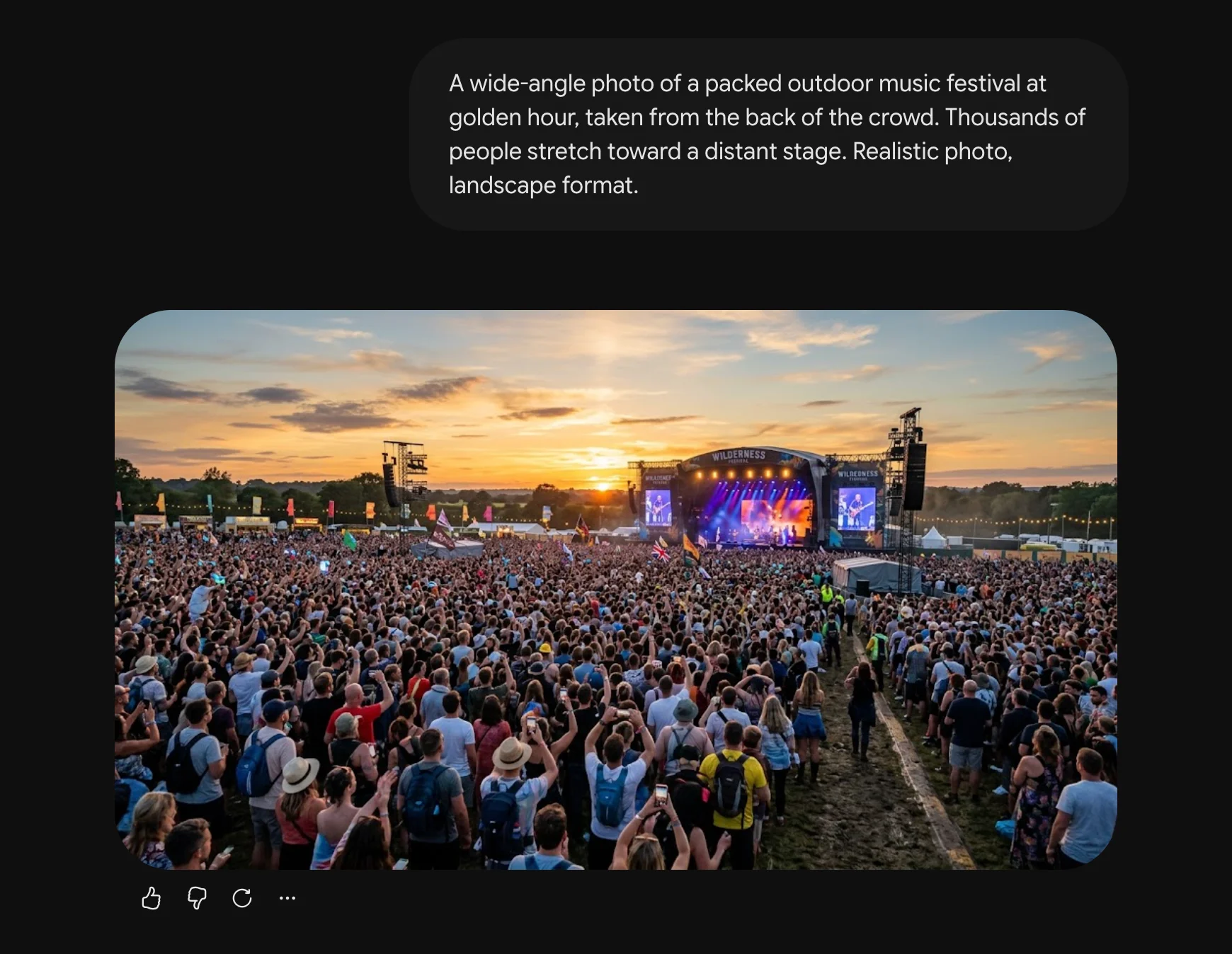
| Crowd scenes | Distant people turn into tangled "spaghetti limbs" and smudged faces. Testers call it "crowd soup." | Keep crowds small, blurred, or cropped. Zoom in before approving. |
| Following a brief exactly | Adds details you didn't ask for. In one test, it hijacked a simple two-person scene by inventing a spaceship. | Be explicit, for example "simple background, nothing else in the frame." Or try Nano Banana Pro. |
| Looking like a real photo | Output can look "overly perfect," missing the grain and small flaws real photos have. | Add grain and small imperfections in an editing app afterward. |
| Logos and stickers | No documented transparent background support. | Use GPT Image 2.5. |
| Perfect English spelling | Scored 91.2% on spelling in one benchmark, behind OpenAI's model line at 98.5%. It duplicated text in another test. | Proofread every word. Use ChatGPT for text-heavy posters. |
| Small faces and fine detail | Google itself says it can struggle here. | Keep important faces large in the frame. |
| Very specific instructions | Asked for clocks showing different times, it made them all identical. | Fix small details with short follow-up edits. |
| Famous people | Blocks prompts that name prominent people, and Google tightened these rules further in 2026. | Use original characters. |
| Client-ready images on the free plan | Free images carry a visible watermark, and several guides report a quiet switch to a weaker model after your daily limit. | Budget for a paid option for client or storefront work. |
Crowds and extra details, up close
Crowd soup is the failure you'll run into most. Wide shots full of people look great at a glance, then fall apart when you zoom in: tangled limbs, melted faces, and figures that blend into each other. It affects Nano Banana Pro too, so paying more won't fix it.
The extra-details habit is sneakier. One reviewer said it "takes creative freedom too far." That can be a gift when you're brainstorming. It's a problem when you have a client brief or a brand guide to follow.
And notice that its "too clean" problem is the exact opposite of ChatGPT's noise problem. One model adds texture you don't want. The other strips out texture you do.
To Google's credit, it's upfront about the limits. Its official model pages say Nano Banana can still struggle with small faces, accurate spelling, and fine details, that its real-world knowledge is "not infallible," and that character consistency "may not always get it right."
What about Nano Banana Pro?
If you use Gemini, you'll eventually see a second option called Nano Banana Pro. Free users get about 2 Pro images a day, and paid plans get more. The name suggests it's the better, premium version.
It isn't, at least not in the way you'd expect. Pro costs about twice as much as Nano Banana 2, it's slower, and on independent blind-vote rankings it actually places lower. When one tester pitted the two against each other across four challenges, it came out a 2 to 2 tie.
Part of the reason is age. Pro runs on Google's previous-generation Gemini 3 model, while Nano Banana 2 runs on the newer Gemini 3.1, and Google hasn't released a newer Pro image model yet. So think of Pro as a different flavor rather than a higher tier. Nano Banana 2 is razor sharp and eager. Pro is softer, more painterly, and more restrained.
Where Pro shines
| Best use | Why it works |
|---|---|
| Staying on brief | More restraint. It didn't invent extra elements in tests where Nano Banana 2 did. |
| Softer, painterly looks | A gentler, more considered style than Nano Banana 2's razor-sharp output. |
| Complex physics in a scene | Reviewers found it still leads on intricate physics in cinematic scenes. |
| Fine camera and lighting control | Adjust the camera angle, depth of field, and color grading, or even switch a scene from day to night. |
| Short text in many languages | Google reports its lowest error rates, mostly under 10%, for single lines of text across languages. |
Where Pro still fails
| Still failing | What goes wrong |
|---|---|
| Value for money | Twice the price of Nano Banana 2, slower, and ranked lower on independent tests. |
| Extreme close-ups | Lost to Nano Banana 2 on a close-up of a human eye. |
| One character across many images | Lost to Nano Banana 2 in a head-to-head consistency test. |
| Crowd scenes | The same "crowd soup" problem as Nano Banana 2. |
| Famous people | Blocks prompts that name prominent people. |
| Practicing for free | Only about 2 images a day on the free plan. |
The rule of thumb: default to Nano Banana 2. Switch to Pro only when Nano Banana 2 keeps adding things you don't want, or when you're after a softer, more artistic look.
Same challenge, both models: how they scored
Specs only tell you so much. The most useful test published so far came from Decrypt, which gave ChatGPT's and Gemini's models the same six challenges and scored every round. The result was a 3 to 3 tie, and how each one won or lost tells you more than any ranking.
| Round | Winner | What decided it |
|---|---|---|
| Dense lettering | Gemini | ChatGPT wrote "STILLL HERE" with an extra L and dropped an apostrophe. Gemini's only slip was a duplicated sticker. |
| Spatial awareness | ChatGPT | Richer atmosphere, and it followed an instruction to show clocks at different times. Gemini set them all the same. |
| Illustration | ChatGPT | Its anime-style sky drew comparisons to the work of film director Makoto Shinkai. |
| Realism | Gemini | Readable text on a blueprint and correctly placed hands. |
| Research-based infographic | Gemini | ChatGPT said the first spot Bitcoin ETFs were approved in 2023. It was January 2024. Gemini hedged on dates it wasn't sure of. |
| Abstract ideas | ChatGPT | It worked invented words into the scene as visible text. Gemini didn't. |
The reviewer summed it up well: what separates the two "isn't overall quality but very tiny specific things: checkable misses, a spelling error in a lettering-heavy scene, a wrong year in a research-driven infographic."
That's where things really stand. Both make beautiful images. The question is which small mistakes each one makes, and which of those mistakes would actually hurt your work.
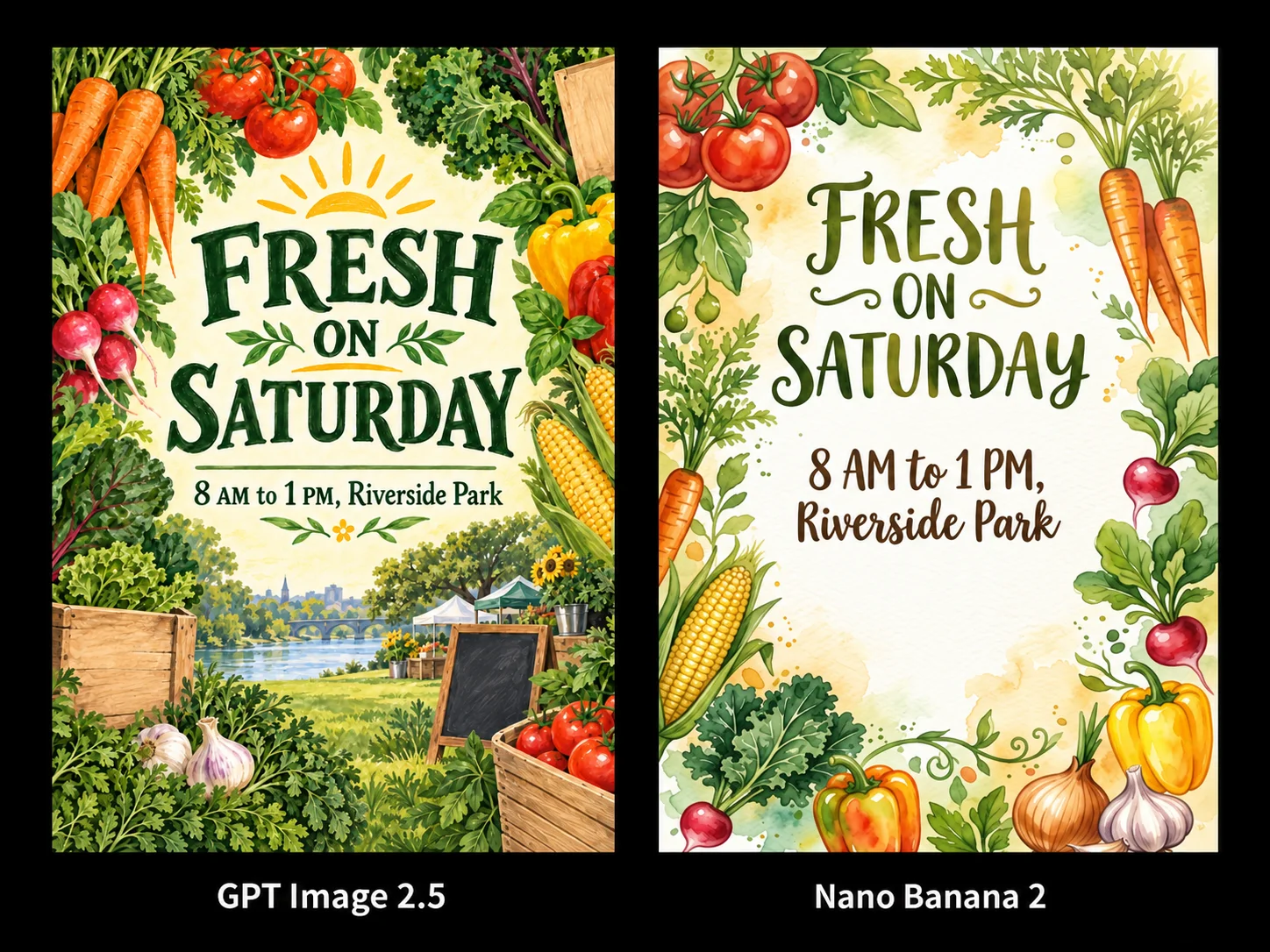
Run your own test. Pick two or three prompts from your actual work, run each through both tools with the exact same wording, and zoom in on the results at full size. Fifteen minutes of your own testing beats any leaderboard, because it measures the job you actually do.
Which one for your task
Find your task in the left column. This is the table worth bookmarking.
| If you need... | Use | Why |
|---|---|---|
| Product photos from your real product | ChatGPT | Keeps your item's shape and details closest to the original |
| Lots of social post ideas, fast | Gemini | 4 to 6 seconds each, and a bigger free allowance |
| YouTube thumbnails with your face | ChatGPT | Best at keeping you looking like you |
| An English flyer, poster, or sale sign | ChatGPT | Most accurate spelling |
| An ad or flyer in another language | Gemini | Renders and translates text inside the image |
| A logo, sticker, or T-shirt design | ChatGPT | Transparent backgrounds |
| An infographic with current facts | Gemini | Checks the live web |
| An infographic from facts you provide | ChatGPT | Kept multi-step sequences in order better in testing |
| A LinkedIn cover or wide website banner | Gemini | Makes wide shapes ChatGPT can't |
| New prices on an existing menu or flyer | Gemini | Changes text without breaking the design |
| A recurring mascot or brand character | Gemini | Held one character across 10 separate images |
| A blog header or book cover illustration | ChatGPT | Stronger illustration, lighting, and mood |
| One hero image refined over many rounds | ChatGPT | Earlier edits survive later ones |
| A beauty, skincare, or food close-up | Gemini | Standout close-up realism |
| A crowd or event scene | Neither yet | Both still struggle with crowds |
| Anything, on zero budget | Gemini | About 20 free images a day, versus 2 to 3 |
The workflow: draft fast, finish carefully
The people who make images every day have mostly settled on the same routine. It works because it uses Gemini's speed and price for exploring and ChatGPT's polish for finishing.
1. Explore in Gemini. Generate 10 to 20 quick variations of your idea. Don't polish anything yet. You're only looking for the composition that works.
2. Pick one winner. Zoom in to full size. Check hands, crowds, small faces, and any text, because that's where Gemini slips.
3. Decide whether to switch. Need a transparent background, perfect English text, or your own face held steady through lots of edits? Move to ChatGPT. Need live facts, a wide banner, or text swapped inside a design? Stay in Gemini.
4. Finish in one place. Both tools remember your earlier edits within a conversation. Jumping back and forth mid-edit throws that memory away.
5. Zoom to 100% before approving. Look for grain and checkerboarding from ChatGPT, and tangled limbs and uninvited extras from Gemini.
6. Check every fact. Dates, prices, addresses, and statistics. Gemini's web search improves the odds, but it won't do your proofreading for you.
Prompts you can copy
Here are four starting points. Swap in your own details.
Place the candle from my photo on a light wooden bedside table next to an open book. Soft morning light from a window on the left. Calm, minimal, and cozy. Keep the candle's label, shape, and color exactly as they are in my photo. Square format.
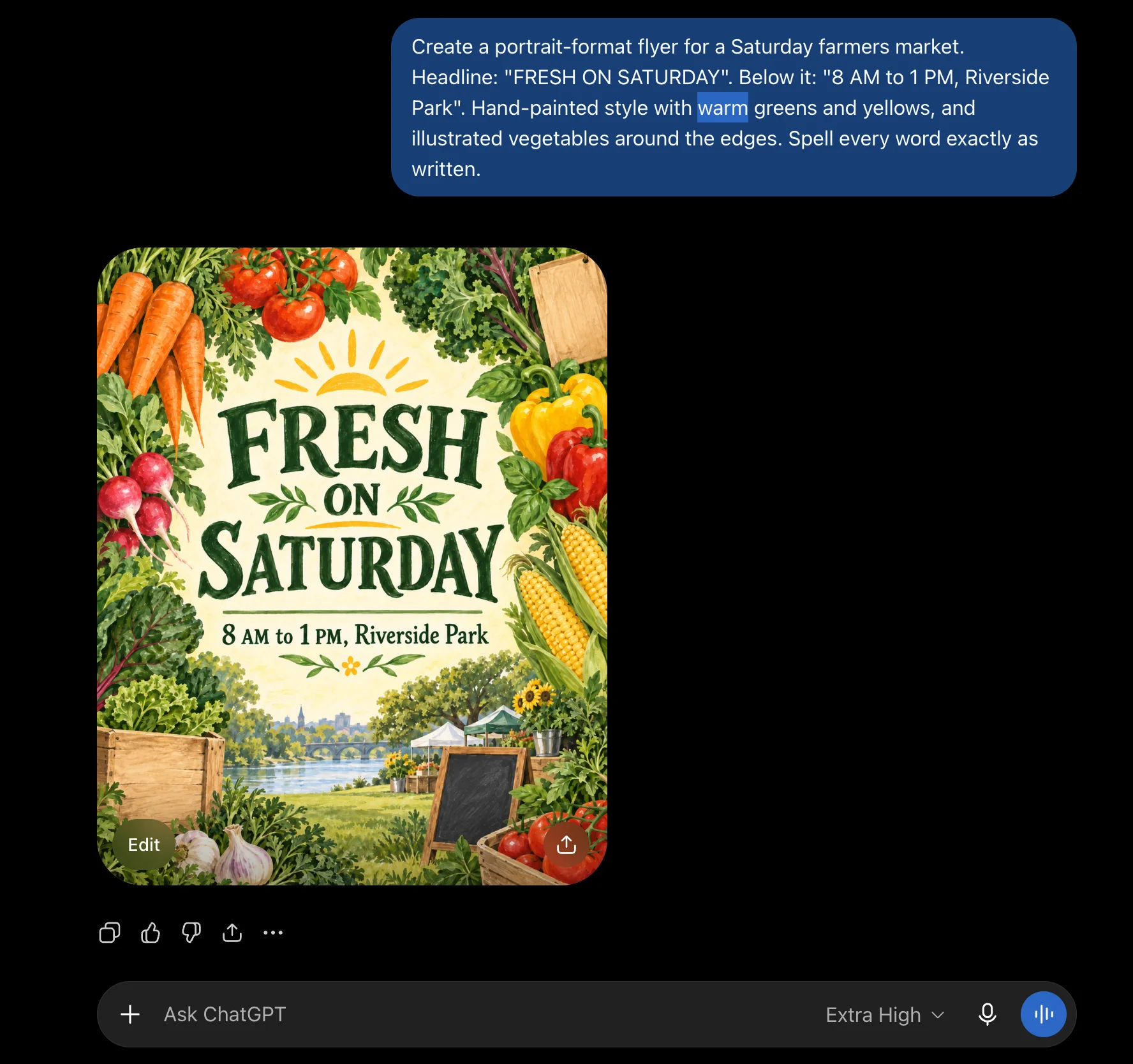
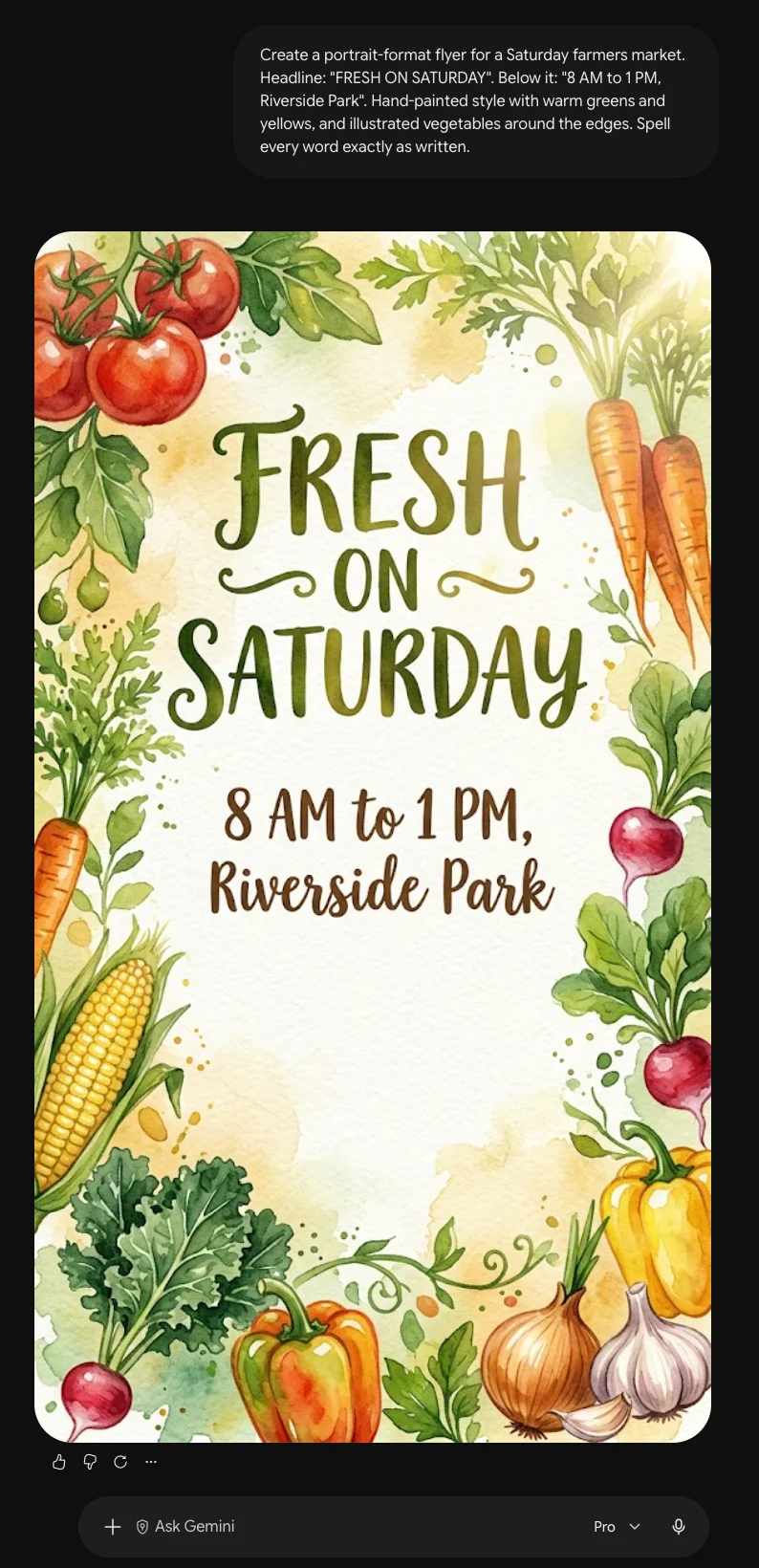
Create a portrait-format flyer for a Saturday farmers market. Headline: "FRESH ON SATURDAY". Below it: "8 AM to 1 PM, Riverside Park". Hand-painted style with warm greens and yellows, and illustrated vegetables around the edges. Spell every word exactly as written.
In this menu, change "Soup of the Day $6" to "Soup of the Day $7". Keep everything else exactly the same, including the layout, fonts, colors, and images.
Create a LinkedIn cover image in a wide 4:1 format for a bookkeeping business. A tidy desk with a laptop and a coffee cup on the right side. Leave the left side as clean, empty space for text. Navy and white color scheme, calm and professional.
Prompt habits that work in both
- Describe four things: the subject, the setting, the lighting, and the style. "A cup of coffee" gets you something generic. "A cup of black coffee on a rainy café windowsill, moody evening light, shot like a film photo" gets you something usable.
- Put exact text in quotation marks, and ask for it to be spelled exactly as written.
- Name the shape you need: square for Instagram feeds, tall for Stories and Reels, and wide for YouTube thumbnails and banners.
- Upload a photo whenever a real person or product needs to look like itself. A reference image beats any description.
- When editing, say what should stay the same, not just what should change.
- Change one thing at a time. Small, specific edits hold up better than one giant rewrite.
The number that matters: not the cost per image, but the cost per image you actually use. A tool that's three times cheaper but needs four tries costs more than one that nails it on the second attempt. Keep a rough count of your retries for a week, and you'll know which tool is really cheaper for your kind of work.
Before you publish anything
Can you use these images commercially?
Yes, with one catch. OpenAI's terms say you own the images you create. Google's terms leave the rights with you while granting Google a license, and commercial use is allowed. Businesses on Google's enterprise platform, Vertex AI, can also get IP indemnification, which gives some protection if an image is challenged over copyright.
The catch applies to both. In most countries, including the US, images made purely by AI have no copyright owner at all, because the US Copyright Office requires human authorship. So you can use and sell these images, but you generally can't stop someone else from using an identical one. If you need to own something outright, like a logo, treat the AI version as a draft and have a designer build the final one.
The invisible watermarks
Both companies now embed SynthID, an invisible watermark created by Google DeepMind, directly into the pixels of their images. OpenAI adopted it in 2026, and it also attaches Content Credentials, a label in the file's data that records which tool made it. You won't see either mark, and they don't change how your image looks. But anyone with a checking tool can confirm an image was made with AI, often even after it's been edited.
The 30-second pre-publish check
- Zoom to 100% and scan the whole image, especially backgrounds, hands, and faces.
- Read every word of text out loud. Spelling errors hide in plain sight.
- Verify every fact, date, price, and address against a real source.
- Make sure no real person, brand, or famous character appears without permission.
If it's for a client, tell them the image was made with AI. The invisible watermarks mean it can be detected anyway, and that conversation goes much better up front than after the fact.
For the curious: the technical details
You don't need any of this to get great results. But if you want to make sense of the headlines, or you're a developer choosing between these models, here's the reference layer.
The name cheat sheet
| You might see | What it means |
|---|---|
| ChatGPT Images 2.5 | The image feature inside ChatGPT. Released September 8, 2026. |
| GPT Image 2.5 | The same model, as offered to developers. |
| Flare | gpt-image-2.5-flare, the faster developer version. |
| Sunburst | gpt-image-2.5-sunburst, the slower, precision-focused developer version. |
| Nano Banana 2 | Google's everyday image model. Released February 26, 2026. |
| Gemini 3.1 Flash Image | The official name for Nano Banana 2. |
| Nano Banana Pro | Google's premium image model. |
| Gemini 3 Pro Image | The official name for Nano Banana Pro. |
| Nano Banana 2 Lite | Gemini 3.1 Flash-Lite Image, the cheapest and fastest tier at about 4 seconds per image. |
| Gemini 3.1 Pro | Not an image model. It's Google's text and reasoning model, which is why there's no "Gemini 3.1 Pro Image." |
Speed
| Model | Typical time per image |
|---|---|
| Nano Banana 2 Lite | About 4 seconds |
| Nano Banana 2 | 4 to 6 seconds |
| GPT Image 2.5 Flare | 24.3 seconds on average |
| GPT Image 2.5 Sunburst | 40.2 seconds on average |
| GPT Image 2.5, complex prompts | Up to 2 minutes |
OpenAI says 2.5 is up to 50% faster than its previous model, and that holds up. A developer on Hacker News who has generated about 50,000 images through the API reported the old model averaging around 104 seconds, with 2.5 landing at 35 to 40. One published benchmark lists these models in milliseconds instead, around 850ms for Nano Banana 2. Those figures almost certainly measure something other than full generation time, so treat them with suspicion. Google's own model page cites 15 to 20 seconds from its internal testing.
Developer pricing
| Model | Cost per image |
|---|---|
| Nano Banana 2 Lite | $0.0336 at 1K |
| Nano Banana 2 | $0.045 at 512px, $0.067 at 1K, $0.101 at 2K, $0.151 at 4K |
| Nano Banana Pro | $0.134 at 1K or 2K, $0.24 at 4K |
| GPT Image 2.5 | Under $0.01 at low quality, about $0.21 at max quality |
OpenAI bills by token rather than by image: $30 per million image output tokens, $8 per million image input tokens, and $5 per million text input tokens, with text output free. Flare and Sunburst share the same rates, but Sunburst uses more tokens per image, so identical rates don't mean identical bills. Google offers 50% off for batch jobs across all three of its image models. Neither Google image model has a free developer tier, according to Google's official pricing page.
What the independent rankings say
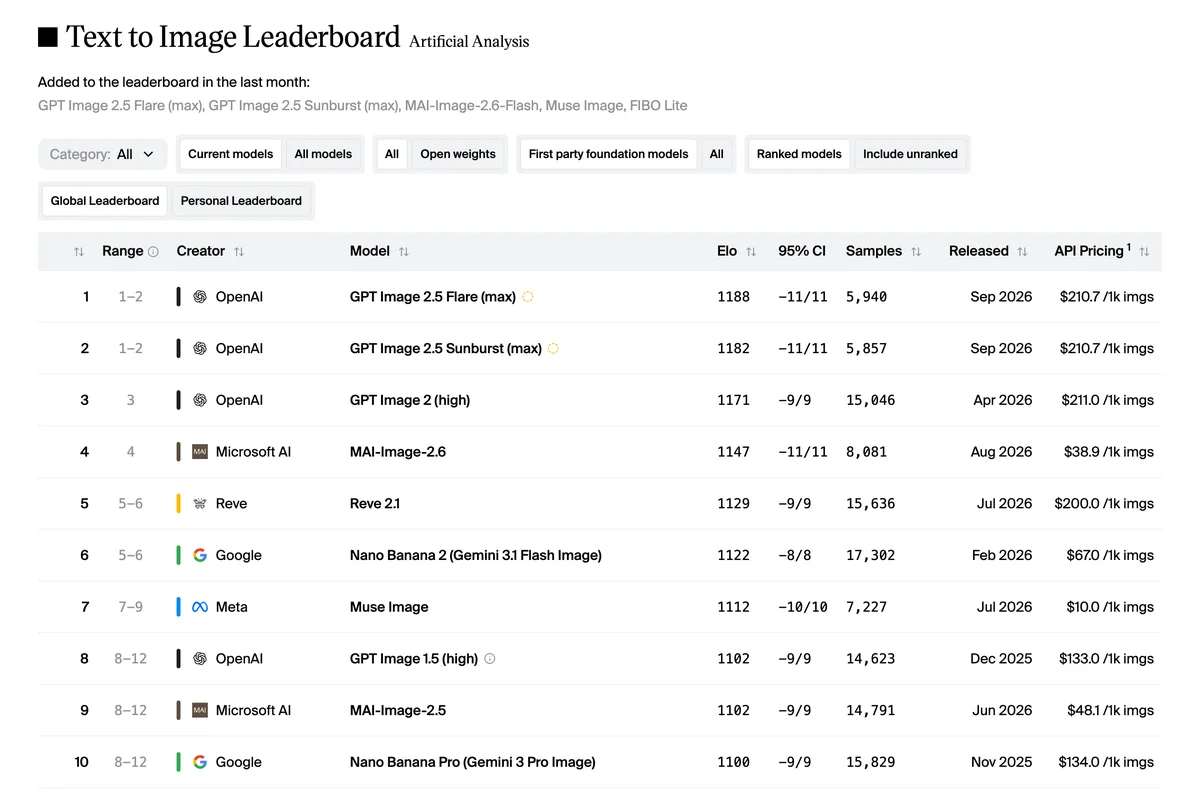
| Rank | Model | Elo score | Cost per 1,000 |
|---|---|---|---|
| 1 | GPT Image 2.5 Flare (max) | 1188 | $210.70 |
| 2 | GPT Image 2.5 Sunburst (max) | 1182 | $210.70 |
| 3 | GPT Image 2 (high) | 1171 | $211.00 |
| 4 | MAI-Image-2.6 | 1147 | $38.90 |
| 6 | Nano Banana 2 | 1122 | $67.00 |
| 10 | Nano Banana Pro | 1100 | $134.00 |
These are scores from the Artificial Analysis text-to-image arena, built from blind votes, as of September 19, 2026. They move a point or two most days as new votes come in, and the site itself marks Flare and Sunburst as statistically tied for first. Its image editing arena shows a similar order: Sunburst first at 1175, Flare second at 1153, Nano Banana 2 ninth at 1106, and Nano Banana Pro twelfth at 1096.
Here's the wrinkle. Google's own model pages say Nano Banana 2 has "the highest Elo score" and that Nano Banana Pro "achieves the highest quality score." Both claims are real, but Google measured against older competitors like GPT-Image 1 and Flux Pro, not GPT Image 2.5. Against that field, Google wins. Against the current field on an independent board, OpenAI does. The lesson applies to both companies: a benchmark published by the company that made the model is marketing until someone independent confirms it.
The text accuracy puzzle
One benchmark scored spelling accuracy at 98.5% for GPT Image 2, the predecessor to 2.5, then 94.8% for Nano Banana Pro and 91.2% for Nano Banana 2. Yet hands-on reviewers often say Gemini is better at text. Both are right, because "good at text" covers four different skills:
Clean English layouts
A short headline on a poster or package. OpenAI wins on raw spelling accuracy.
Text in busy scenes
Signs in a street shot or labels on a blueprint. Gemini wins.
Swapping text in a design
Changing the words while the layout survives. Gemini wins clearly.
Other languages
Rendering and translating non-English text. Gemini wins.
Spec sheet
| Spec | GPT Image 2.5 | Nano Banana 2 | Nano Banana Pro |
|---|---|---|---|
| Released | Sep 2026 | Feb 2026 | Nov 2025 |
| Max resolution | 4K (3840 x 2160) | 4K | 4K |
| Image shapes | 1:3 to 3:1 | 14 ratios, up to 8:1 and 1:8 | Wide range, up to 4:1 and 1:4 |
| Quality settings | Auto, low, medium, high, xhigh, max | Set by resolution, 512px to 4K | Set by resolution, 1K to 4K |
| Reference images | Up to 16 | 14 objects, 5 characters | 14 objects, 5 characters |
| Transparent backgrounds | Yes, PNG and WebP | Not documented | Not documented |
| Live web search | No | Yes | Optional |
| Accepts | Text, images | Text, images, video, PDF | Text, images |
| Watermarking | SynthID plus Content Credentials | SynthID | SynthID |
Where this leaves you
A year ago, choosing an AI image tool meant finding the one that was simply better. That's no longer how it works. These two are close enough in quality that the gap between them is smaller than the gap between a careful prompt and a lazy one.
What separates them now is personality. ChatGPT's model is careful, slow, and pricier, and it protects what you've already approved. Gemini's is fast, cheap, and eager, and it'll happily add three things you never asked for. One has a noise problem. The other has a restraint problem. Knowing which one you're dealing with is most of the skill.
Both will keep leapfrogging each other, probably every few months, and each release will arrive with a chart showing the new one on top. You now know how to read those charts: check who published it, check what it was measured against, and check whether it's winning at the thing you actually do.
So here's your next step. Pick two or three images you need this month, maybe a product shot, a social post, and a flyer. Make each one in both tools. By the end of the afternoon, you'll know which one belongs in your business, and you'll have finished images to show for it.